
2003 – 2008 Mazda6, 2006-2007 Mazdaspeed6, and 2004-2006 MPV – PASSENGER AIR BAG SAFETY RECALL 2618F
A. VEHICLE INSPECTION PROCEDURE
- Verify that the vehicle is within the following ranges:
Zone A
| Model | Note |
| 2003-2008 Mazda6, 2006-2007 Mazdaspeed6, 2004-2006 MPV | Originally sold or ever registered in Hawaii, California, Texas, Louisiana, Mississippi, Alabama, Georgia, Florida, South Carolina |
Zone B
| Model | Note |
| 2003-2008 Mazda6, 2006-2007 Mazdaspeed6, 2004-2006 MPV | Originally sold or ever registered in Arizona, Arkansas, Delaware, District of Columbia, Illinois, Indiana, Kansas, Kentucky, Maryland, Missouri, Nebraska, Nevada, New Jersey, New Mexico, North Carolina, Ohio, Oklahoma, Pennsylvania, Tennessee, Virginia, West Virginia |
Zone C
| Model | Note |
| 2003-2008 Mazda6, 2006-2007 Mazdaspeed6, 2004-2006 MPV | Originally sold or ever registered in Alaska, Colorado, Connecticut, Idaho, Iowa, Maine, Massachusetts, Michigan, Minnesota, Montana, New Hampshire, New York, North Dakota, Oregon, Rhode Island, South Dakota, Utah, Vermont, Washington, Wisconsin, Wyoming |
- If the vehicle is within the above ranges, proceed to Step 2.
- If the vehicle is not within the above ranges, return vehicle to the customer or inventory.
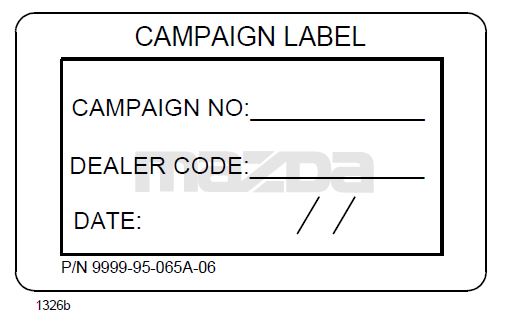
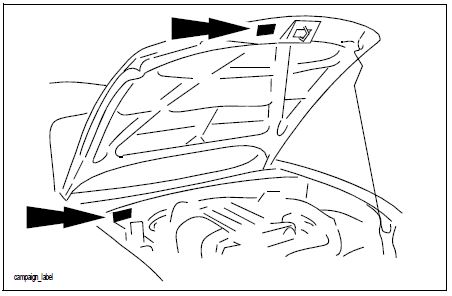
- Perform a Warranty Vehicle Inquiry using your eMDCS System and inspect vehicle for Campaign Labels Recall 2618F attached to the vehicle’s hood or bulkhead. Refer to eMDCS System – Warranty Vehicle Inquiry Results table below.
NOTE: Be sure to verify Recall number as the vehicle may have multiple Recall labels.
 |  |
eMDCS System – Warranty Vehicle Inquiry Results:
| If eMDCS displays: | Campaign Label is: | Action to perform: |
| RECALL 2618F OPEN | Present | Contact the Warranty Hotline at (877) 727-6626 option 3 to update vehicle history. |
| Not present | Proceed to “B. REPAIR PROCEDURE”. | |
| RECALL 2618F CLOSED | Present | Return vehicle to inventory or customer. |
| Not present | Proceed to “C. CAMPAIGN LABEL INSTALLATION”. | |
| RECALL 2618F is not displayed | Does not apply | Recall does not apply to this vehicle. Return vehicle to inventory or customer. |
B. REPAIR PROCEDURE
| Year / Model | Page No. |
2003-2008 Mazda 6, 2006-2007 Mazdaspeed6 6, 2006-2007 Mazdaspeed6 | 3 |
2003-2008 Mazda6 2007-2007 Mazdaspeed6: (Part Number: GJYB-57-K80)
Passenger-Side Air Bag Inflator Replacement Procedure:
Parts Information: The service parts are available in one box
Inflator APPS-7
Nuts(x4)
Collar C
Collar A
Stopper Plate
Felt Tape(x2)
CE Label – Not Needed
Outline:
- Remove the inflator from the passenger-side air bag module (A), then replace it with a modified one (B)
- Pack and return the removed inflator as follows:
IMPORTANT: Be sure to follow the packing and shipping instructions provided in the carton and in Attachment IV, Air Bag Inflator Return Instructions.
CAUTION:
- Use the same carton which was used to deliver a new inflator. It is a specialized box that is internationally accepted for shipping an inflator.
- Pack the old inflator in the box exactly in the same manner as the new inflator was packed.
Air Bag Module Removal:
WARNING:
- Perform the replacement in a clean environment. Oil, grease, water, etc. on components may cause the air bag modules to fail to deploy in an accident, which may cause serious injury. Do not allow oil, grease, water, etc., on components.
- Inserting a screwdriver, etc., into the connector of an air bag module may damage the connector and cause the air bag module to deploy improperly, which may cause serious injury. Do not insert any foreign objects into the connector.
- Do not disassemble the vehicle, other than instructed here.
- Do not make an attempt to directly supply electrical power to the module and the inflator.
- Keep the module facing upwards at all times, except during replacement.
- Do not use the module and new inflator if they were dropped on the ground.
- Avoid module and inflator exposure to temperatures of 194 degrees F (90 degrees C) or more.
- Turn the ignition switch to the LOCK position.
- Record the customer’s preset radio stations.
- Disconnect the negative battery cable and wait for one (1) minute or more.
- Remove the glove compartment.
a. Detach the string from the glove compartment.
b. Press the glove compartment stoppers (A) inward.
c. Lower the glove compartment (B) downward and pull the clips (C) to remove it.
- Remove the navigation unit (if equipped).
a. Remove the bolts.
b. Remove the navigation unit.
- Remove the air bag module.
CAUTION:
- Be careful when prying out the stopper plate. Otherwise, damage to the stopper plate could occur.
- The stopper plate must be pried up before disconnecting the connector. Otherwise, the connector could be damaged if trying to disconnect it with the stopper plate engaged.
- Use extreme care when disconnecting the connector. Otherwise, damage to the connector could occur.
a. Using a flathead screwdriver, gently pry out the connector stopper plate.
b. Disconnect the connectors (A).
c. Remove the bolt (B).
NOTE: If the connector is broken, replace the following new short code.
Part number: GAY2-67-SH0
NOTE: If a stopper plate (A) is broken, replace the stopper plate with a new one, if applicable. Two types of stopper plates exist – an old type (GAY1-67-022) and a new type (GAY2-67-022). The exact switching date from the old type to the new type is unknown. Confirm the configuration of the stopper plate used on the vehicle in repair, and then use the one with the same configuration.
| Old Type (GAY1-67-022) | New Type (GAY2-67022) |
- Lay a protective cloth on the work bench, then place the air bag module on it to avoid any damage or scratches to the surface.
Inflator Replacement:
- Loosen four (4) nuts until the upper surface of the nuts are aligned with the top edge of the screw thread.
For easier inflator removal, depress the four (4) nuts and make a gap between the inflator and air bag module. NOTE: Do not depress excessively as the module body may detach.
- Remove the four (4) nuts, then remove the stopper plate from the air bag module.
NOTE: Discard all of the nuts and stopper plate.
- Push the inflator end with fingers, then remove it by sliding it in the direction shown below.
IMPORTANT: Return the removed inflator in the same carton in which the new part was received. Carefully follow the packing and shipping instructions included in the carton.
- Paste the felt tape to Straight area (Orange area) the retainer. (Paste in two places)
- Fold it in half and paste it inside the retainer. Make it the same on both sides.
- Attach the collar A and C to replacement inflator.
(Location of the collar A: The position is the 1st stage side of the inflator.)
(Location of the collar C: The position is the 2nd stage side of the inflator.)
- Insert to align the side of the retainer and guide line (Black line) of replacement inflator.
- Insert the inflator up to the position where it touches the stopper.
The connector direction is 15 ° from the bottom of the retainer.
- Set the new stopper plate (A) by gently pushing until it touches with the inflator side (B).
- Keeping the position above, hand tighten the four (4) new nuts.
- Tighten the four (4) new nuts to the specified torque in the order shown below (1, 2, 3, 4).
Tightening Torque: 35 +/- 1.8 in-lbf. {39.8 +/- 2.0 kgf-cm, 3.9 +/- 0.4 Nm} DO NOT USE ANY AIR TOOLS
Air Bag Module Reinstallation:
- Install the air bag module assembly.
- Tighten the bolt (A) to the specified torque.
Tightening Torque: 70 – 104 in-lbf. {80 – 120 kgf-cm, 7.9 – 11.7 Nm}
- Re-connect the connectors (B) to air bag module.
- Securely lock the connectors by depressing the stoppers (A) on the back of the connector.
- Reconnect the negative battery cable.
- Turn the ignition switch to the ON position.
- Verify that the air bag system warning light illuminates for approx. 6 sec., then goes out.
NOTE: If the air bag system warning light does not operate in the manner described above, there is a mal- function in the system. Inspect the system following the on-board diagnostic system procedure according to MS3 online or the Workshop Manual (section 08 Restraints).
- Reinstall the navigation unit (if equipped).
- Reinstall the glove box.
- Re-enter the customer’s preset radio stations.
- Proceed to “C. CAMPAIGN LABEL INSTALLATION”.
| Year / Model | Page No. |
| 2004 – 2006 MPV | 14 |
2004 – 2006 MPV: (Part Number: GJYB-57-K80)
Passenger-Side Air Bag Inflator Replacement Procedure:
Parts Information: The service parts are available in one box.
Inflator APPS-7
Nuts(x4)
Collar C
Collar A
Stopper Plate
Felt Tape(x2)
CE Label – Not Needed
Outline:
- Remove the inflator from the passenger-side air bag module (A), then replace it with a modified one (B).
- Pack and return the removed inflator as follows:
IMPORTANT: Be sure to follow the packing and shipping instructions provided in the carton and in Attachment IV, Air Bag Inflator Return Instructions.
CAUTION:
- Use the same carton which was used to deliver a new inflator. It is a specialized box that is internationally accepted for shipping an inflator.
- Pack the old inflator in the box exactly in the same manner as the new inflator was packed.
Air Bag Module Removal:
WARNING:
- Perform the replacement in a clean environmental. Oil, grease, water, etc. on components may cause the air bag modules to fail to deploy in an accident, which may cause serious injury. Do not allow oil, grease, water, etc., on components.
- Inserting a screwdriver, etc., into the connector of an air bag module may damage the connector and cause the air bag module to deploy improperly, which may cause serious injury. Do not insert any foreign objects into the connector.
- Do not disassemble the vehicle, other than instructed here.
- Do not make an attempt to directly supply electrical power to the module and the inflator.
- Keep the module facing upwards at all times, except during replacement.
- Do not use the module and new inflator if they were dropped on the ground.
- Avoid module and inflator exposure to temperatures of 194 degrees F (90 degrees C) or more.
- Turn the ignition switch to the LOCK position.
- Record the customer’s preset radio stations.
- Disconnect the negative battery cable and wait for one (1) minute or more.
- Remove the glove compartment.
a. Bend the stoppers inward (A), then remove.
b. Pull the glove compartment toward you while pushing it downward (1), then remove clip (A).
c. Slide the glove compartment toward driver’s side door (2).
- Remove the air bag module (A).
a. Disconnect the connector (B).
b. Remove the bolts (C).
- Lay a protective cloth on the work bench, then place the air bag module on it to avoid any damage or scratches to the surface.
Inflator Replacement:
- Using a flathead screwdriver, pry out the connector stopper plate (A), then disconnect the connector.
CAUTION:
- Be careful when prying out the stopper plate. Otherwise, damage to the stopper plate could occur. The stopper plate must be pried up before disconnecting the connector. Otherwise, the connector could be damaged if trying to disconnect it with the stopper plate engaged.
- Use extreme care when disconnecting the connector. Otherwise, damage to the connector could occur.
NOTE: If a stopper plate (A) is broken, replace the stopper plate with a new one, if applicable. Two types of stopper plates exist – an old type (GAY1-67-022) and a new type (GAY2-67-022). The exact switching date from the old type to the new type is unknown. Confirm the configuration of the stopper plate used on the vehicle in repair, and then use the one with the same configuration.
| Old Type (GAY1-67-022) | New Type (GAY2-67022) |
- Loosen four (4) nuts until the upper surface of the nuts are aligned with the top edge of the screw thread.
- For easier inflator removal, depress the four (4) nuts and make a gap between the inflator and air bag module.
NOTE: Do not depress excessively as the module body may detach.
- Remove the four (4) nuts, then remove the stopper plate from the air bag module.
NOTE: Discard all of the nuts and stopper plate.
- Push the inflator end with fingers, then remove it by sliding it in the direction shown.
IMPORTANT: Return the removed inflator in the same carton in which the new part was received. Carefully follow the packing and shipping instructions included in the carton.
- Paste the felt tape to Straight area (Orange area) the retainer. (Paste in two places)
- Fold it in half and paste it inside the retainer. Make it the same on both sides.
- Attach the collar A and C to replacement inflator.
(Location of the collar A: The position is the 1st stage side of the inflator.)
(Location of the collar C: The position is the 2nd stage side of the inflator.)
- Insert to align the side of the retainer and guide line (Black line) of replacement inflator.
- Insert the inflator up to the position where it touches the stopper.
The connector direction is 15 ° from the bottom of the retainer.
- Set the new stopper plate (A) by gently pushing until it touches with the inflator side (B).
- Keeping the position above, hand tighten the four (4) new nuts.
- Tighten the four (4) new nuts to the specified torque in the order shown below (1, 2, 3, 4).
Tightening Torque: 35 +/- 1.8 in-lbf. {39.8 +/- 2.0 kgf-cm, 3.9 +/- 0.4 Nm} DO NOT USE AIR TOOLS
- Securely lock the connectors by depressing the stoppers on the back of the connector (A).
Air Bag Module Reinstallation:
- Re-connect the connector (B), then install the air bag module (A) and the bolt (C).
Torque: 60.8 – 86.7in-lbf. {70 – 100 kgf-cm, 6.8 – 9.8 Nm}
- Install the connector as shown.
- Reconnect the negative battery cable.
- Turn the ignition switch to the ON position.
- Verify that the air bag system warning light illuminates for approx. 6 sec., then goes out.
NOTE: If the air bag system warning light does not operate in the manner described above, there is a mal- function in the system. Inspect the system following the on-board diagnostic system procedure according to MS3 online or the Workshop Manual (section 08 Restraints).
- Reinstall the glove box.
- Re-enter the customer’s preset radio stations.
- Proceed to “C. CAMPAIGN LABEL INSTALLATION”.
C. CAMPAIGN LABEL INSTALLATION
- Fill out a blue “Campaign Label” (9999-95-065A-06) with Campaign No: “2618F”, your dealer code, today’s date.
- Affix it to the hood or bulkhead as shown:
- Return the vehicle to customer.
Remedy Instructions and TSB
RCRIT-19V781-7066.pdf 1699.049KB

- [Easy to Use—Work Out of the Box] + [FOXWELL 2026 New Version] FOXWELL NT604 Elite scan tool is the 2026 new version from FOXWELL, designed for car owners who want to figure out the cause of issues before fixing car problems by scanning common systems like ABS, SRS, engine, and transmission. The NT604 Elite obd2 scanner diagnostic tool comes with the latest software—no need to waste time downloading software first. Plug the scanner into the OBDII port with OBDII cable to start the diagnosis.
- [Affordable] + [Reliable Car Health Monitor] Will you be confused what happens when the warning light of ABS/SRS/transmission/check engine flashes? Instead of taking your cars to dealership, this FOXWELL scanner will help you do a thorough scanning and detection for your cars and pinpoint the root cause. Note:The device is a diagnostic tool, not a repair tool. To turn off a warning light, you must first physically repair the issue causing it. Only then can the scanner be used to clear the corresponding fault code.
- [5 in 1 Car Diagnostic Scanner] Compared with obd scanners (50-100), NT604 Elite code scanner not only includes their OBDII diagnosis but also serves as ABS/SRS scanner, transmission and check engine code reader. When it’s an odb2 scanner, you can use it to check if your car is ready for annual test through I/M readiness menu. In addition, live data stream, built-in DTC library, data play back and print, all these features are a big plus for it. Note: doesn't support maintenance functions like reset or relearn. For the SRS system, NT604 Elite can read and clear common fault codes not caused by a crash, but crash/collision data cannot be cleared.
- [Fantastic AUTOVIN] + [No extra software fee] Through the AUTOVIN menu, this NT604 Elite car scanner allows you to get your V-IN and vehicle info rapidly, no need to take time to find your V-IN and input one by one. What's more, the NT604 Elite ABS SRS scanner supports 60+ car brands from worldwide (America/Asia/Europe). You don’t need to pay extra software fee. AUTOVIN may not work on some older vehicles or certain vehicle brands. If AUTOVIN fails, please input the vin code manually or go to the Diagnostic Menu to select your vehicle model.
- [Solid protective case KO plastic carrying bag] + [Lifetime update] Almost all same price-level car scanner diagnostic tool only offers plastic bag to hold the scanner.However, NT604 Elite automotive scanner is equipped with solid protective case, preventing your obd2 scanner from damage. Then you don’t need to pay extra money to buy a solid toolbox.


- MAINTAIN PEAK PERFORMANCE AND SAFETY ON THE ROAD - Easily find and fix the problem with your vehicle using the INNOVA 5610 bidirectional scan tool. This OBD2 scanner diagnostic tool provides real-time solutions to troubleshoot issues. Access OBD2 and OEM live data with ease, making it an essential car scanner diagnostic tool. Perfect for those seeking reliable car diagnostic scanner and code readers & scan tools for vehicles.
- PRO-LEVEL FUNCTIONALITIES - Use the INNOVA 5610’s Enhanced Data Stream to view live data for advanced systems like ABS, SRS, transmission, and engine. The Special Reset Function lets you use dealership-level re-learn procedures. This car diagnostic scanner is ideal for those needing a bidirectional scan tool or mechanic tools automotive for professional repairs. Compatible with select vehicle makes and models; not universal.
- COMMAND WITH BIDIRECTIONAL CONTROLS - The INNOVA 5610 bidirectional scan tool sends commands to test functions such as fuel pump on/off or retracting the electronic parking brake. With this car scanner diagnostic for all cars, you can operate like a pro. Ideal for those seeking a car code reader and reset tool or advanced fixd car diagnostic tool capabilities. Compatible with select vehicle makes and models; not universal.
- EASY TO USE - The INNOVA 5610 OBD2 scanner diagnostic tool supports English, Spanish, and French. Easily use this scanner for car on most 1996 - 2023 (2024 coming soon) OBD2 vehicles to verify repairs. Designed for ease of operation, it’s a dependable code reader for cars and trucks and check engine code reader. To confirm vehicle coverage, please utilize Innova's Coverage Checker.
- BUY AND DRIVE WITH CONFIDENCE - Backed by ASE-Certified support, this car scanner pairs with the RepairSolutions2 app, trusted by 4M users, for wireless OBD scanner functionality. With free updates and no subscription fees, this durable car computer diagnostic reader ensures you’re prepared for any repair. A must-have diagnostic scanner for vehicles.

- OBD2 SCANNER FOR ALL SYSTEMS – The INNOVA SD35 is a tablet-based OBD2 scanner designed for advanced diagnostics. Read and clear check engine light, ABS, SRS, and TPMS codes, plus test your car battery and alternator to prevent unexpected failures. Vehicle coverage may vary. Please use Innova’s Coverage Checker to verify compatibility.
- ALL-SYSTEM DIAGNOSTICS & LIVE DATA – Unlike basic code readers, this OBD2 scanner for all vehicles scans engine, transmission, ABS, SRS, and more. Get real-time live data, including RPM, fuel trims, temperature readings, and oxygen sensor performance.
- OBD2 TABLET WITH USER-FRIENDLY INTERFACE – This automotive scan tool features a high-resolution display, making vehicle diagnostics faster and easier.
- ADVANCED TPMS, OIL RESET & SERVICE FUNCTIONS – Perform TPMS sensor checks, oil light reset, and other service resets with ease This professional diagnostic tool provides comprehensive vehicle maintenance capabilities in one device.
- WIDE VEHICLE COVERAGE (1996 & NEWER CARS & TRUCKS) – This OBD2 scanner Bluetooth tablet is compatible with Toyota, Ford, Honda, Chevrolet, Nissan, Dodge, and more. However, feature coverage may vary. Please use Innova's Coverage Checker to verify coverage.

- [Brand-New ArtiDiag500] We've got everything you're looking for! Forget basic OBD2 scanners; TOPDON's ArtiDiag500 car scanner offers more. The all-new ArtiDiag500 not only includes full OBD2 functions and 4-system diagnostics but also provides DIYers with 6 maintenance services. The brand-new, cost effective AD500 is back in full swing!
- [4-System Diagnostics] DIY enthusiasts, take notice! Will these 4-system diagnostics be the treasure you've been seeking? The ArtiDiag500 code reader offers in-depth testing for the engine, transmission, ABS, and SRS systems, reading fault codes and data streams. It also visualizes real-time data in chart form, simplifying complex data for storage and future playback, aiding DIY users in problem detection.
- [6 Reset Functions] Hey, hang tight for a moment. With these 6 reset functions, the ArtiDiag500 has got you covered. It offers throttle adaptation along with reset capabilities for Oil, SAS, TPMS, BMS, and EPB. Seamlessly aligning the throttle, battery, tires, and brake pads with your vehicle, it also adjusts the steering angle and turns off the oil light. Looking to restore your car to its original condition? Look no further than the ArtiDiag500.
- [Multiple Functions] The Smart AutoVIN of this TOPDON OBD2 scanner keeps track of your manual selections for vehicle make, model, and year and directs you to the suitable diagnostics. Max 4 Live Data streams integrated for much easier data processing. Diagnostic feedback online with this diagnostic tool to help you get tough repair operations well-completed. Real-time car battery voltage monitoring identifies probable vehicle defects.
- [Wide Vehicle Coverage] ArtiDiag500 currently supports 67+ car brands, 10,000+ models, covering most vehicles worldwide. Supports cutting-edge CAN FD protocols, making it compatible with modern vehicles including 2020+ GM & Chrysler. It supports FCA AutoAuth (official Secure Gateway access) to stay up to date with newer models from Chrysler, Jeep, Fiat, and others. Plus, it's fully compatible with Android 11 for smoother use.

- 【Full Systems Automotive Diagnostic】 More than checking engine, ABS and SRS, OBDMATE OM970 obd2 scanner performs comprehensive diagnostics on all electric modules. It quickly scans and clears fault codes, turns off warning lights, reads live data, and features Auto-VIN technology.
- 【Live Datastream&4-in-1 Graph】 Easily view live sensor data such as RPM, fuel trims, ATF temperature, wheel speed sensor, battery voltage and so on. OM970 scan tool also supports 4-in-1 trend graphing. Spend just 3 minutes to check – and you'll know exactly what's going wrong, helping you avoid hundreds in dealership diagnostic fees.
- 【One-Click I/M Readiness&Full OBD2 Functions】 Press F1 to get an intuitive corloured form about whether your vehicle's emissions-related systems are operating properly. Help you get smog-check ready quickly. OM970 obd2 diagnostic tool supports all essential OBD2 functions you need. Plus, it features battery voltage test and DLC 16-PIN test.
- 【Straightforward Menus with Easy Navigation】 All functions are easy to understand without obscure decriptions. 3.5" Large screen delivers clear readings while keeping one-hand operation. The car diagnostic tool comes with a silicone protective case and a hard-shell carrying case, ensuring long-lived durability and drop resistance.
- 【Budget-Friendly, No Subscriptions, Free Software Updates】 Plug and play: no bluetooth pairing, monthly fees, Wi-Fi connection, or any other troublesome initial settings. OM970 obd2 scanner works out of the box with the latest software. Lifetime free upgrade.
This product presentation was made with AAWP plugin.