| Subject:
CRACKS AROUND EDGE OF ACTIVE DRIVING DISPLAY (LOOKS FUZZY) | Bulletin No: 09-020/16 |
| Last Issued: 03/29/2016 |
BULLETIN NOTE
This bulletin supersedes the previously issued bulletin(s) listed below: The changes are noted in Red beside the change bars.
| Previously issued TSBs: | Date issued: |
| 09-037/15 | 09/22/2015 |
APPLICABLE MODEL(S)/VINS
2016 Mazda2 Mexico built vehicles with VINs between 3MD DJ ****** 101111 to 103355 (produced from April 23, 2015 to September 29, 2015)
2015 Mazda3 Mexico built vehicles with VINs between 3MZ BM ****** 213930 to 260783 (produced from April 23, 2015 to September 29, 2015)
2015 Mazda3 Japan built vehicles with VINs between JM1 BM ****** 259983 to 275744 (produced from February 7, 2015 to May 27, 2015)
2016 Mazda6 vehicles with VINs lower than JM1 GJ ****** 411770 to 434008 (produced from February 7, 2015 to May 27, 2015)
2016 CX-3 vehicles with VINs lower than JM1 DK ****** 100037 to 103523 (produced from February 7, 2015 to May 27, 2015)
DESCRIPTION
Some vehicles may experience a fuzzy appearance (tiny cracks) around the edge of the Active Driving Display.
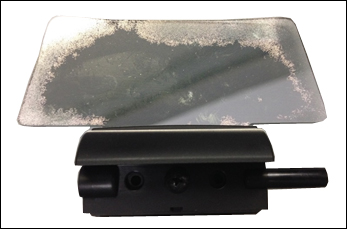
Customers having this concern should have their vehicle repaired using the following repair procedure.
REPAIR PROCEDURE
- Verify customer concern.
- Replace the Active Driving Display. Refer to MS3 online or Workshop Manual section 09-22:
- Mazda2 – ACTIVE DRIVING DISPLAY REMOVAL/INSTALLATION
- Mazda3 – ACTIVE DRIVING DISPLAY REMOVAL/INSTALLATION
- Mazda6 – ACTIVE DRIVING DISPLAY REMOVAL/INSTALLATION
- CX-3 – ACTIVE DRIVING DISPLAY REMOVAL/INSTALLATION
- Verify repair.
PART(S) INFORMATION
| Description | Qty. | Notes | Part Number |
| Multi-Meter Lens | 1 | Active Driving Display | BHR1-55-459 |
WARRANTY INFORMATION
NOTE:
- This warranty information applies only to verified customer complaints on vehicles eligible for warranty repair.
- This repair will be covered under Mazda’s New Vehicle Limited Warranty term.
- Additional diagnostic time cannot be claimed for this repair.
| Mazda2, Mazda6, CX-3 | Mazda3 | |
| Warranty Type | A | A |
| Symptom Code | 88 | 88 |
| Damage Code | 9F | 9F |
| Part Number Main Cause | BHR1-55-459 | BHR1-55-459 |
| Quantity | 1 | 1 |
| Operation Number / Labor Hours: | XXL6RXRX / 0.3 Hrs. | XXL6RXRX / 0.4 Hrs. |
09-020/16
09-037/15
09/22/2015

- 【Reliable Offline GPS Navigation】: Enable built-in offline navigation for the United States, Canada, and Mexico directly through your vehicle’s factory infotainment system. Ideal for road trips, tunnels, mountain highways, rural areas, and locations with weak cell coverage. Designed as a dependable backup navigation solution alongside CarPlay or smartphone apps
- 【Compatible Mazda Models】: Compatible with select Mazda vehicles equipped with the factory Mazda Connect system and SD card slot: CX-30 (2025–2026), Mazda 3 (2025–2026), CX-50 (2025–2026), CX-70 (2025–2026), MX-5 (2024–2026), CX-90 (2026)
- 【VIN Compatibility Assistance & Free exchange Support】: Not sure which navigation card your vehicle requires? Message us with your VIN for compatibility verification before purchase. Ordered the wrong model? If a compatible model is available, we offer a one-time free exchange within 2 months of purchase
- 【Simple Plug-and-Play Activation】: No dealer visit or complicated setup required. Insert the SD card into the vehicle’s SD slot with the engine off, then restart the vehicle to activate factory navigation automatically
- 【Factory Navigation Features & HUD Support】: Works directly through your vehicle’s factory infotainment system for a clean OEM-style navigation experience without extra screens or phone mounts. Supports voice-guided navigation and HUD features on compatible vehicles
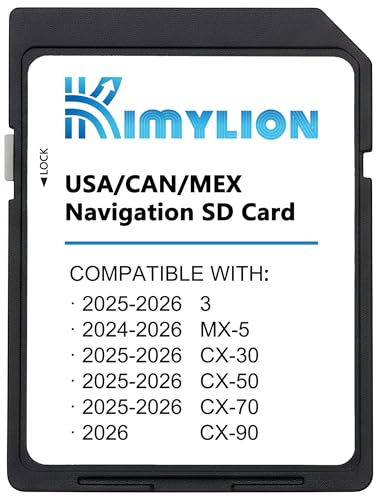
- North America GPS Map Coverage – Preloaded navigation SD card with detailed road maps for the USA, Canada, and Mexico. Provides reliable turn-by-turn directions to help you reach your destination with confidence, even without an internet connection
- Wide Mazda Compatibility (Select 2024–2026 Models) – Compatible with select Mazda CX-30, Mazda 3, CX-50, CX-70 (2025–2026), MX-5 (2024–2025), and CX-90 (2026) equipped with navigation-enabled systems
- Easy Plug & Play Installation – Simply insert the navigation SD card into your vehicle's designated SD slot (often found in the center console or glove box) before starting the engine. No programming, no dealership visit, and no internet connection required—your system is ready to use in minutes
- Seamless System Integration & Smart Features – Designed to integrate smoothly with your vehicle’s infotainment system, offering clear route guidance, speed limit display, and compatibility with Head-Up Display (HUD) and voice command functionality on supported models (When your vehicle is equipped with these features)
- Reliable Offline Navigation for Any Journey – Navigate confidently without relying on cellular signal or mobile data. Ideal for road trips, remote areas, and as a dependable backup when smartphone GPS is unavailable

- 【Updated Navigation SD Card for USA, Canada & Mexico】This updated navigation SD card comes pre-loaded with the latest offline navigation map for the United States, Canada, and Mexico. No cell signal needed—enjoy extensive, self-contained map data covering millions of points of interest, including hotels, gas stations, restaurants, pet stores. Whether you’re navigating busy city traffic, rural backroads, or remote areas, this navigation memory card delivers full, reliable offline guidance that never leaves you stranded when the signal drops.
- 【Vehicle Compatibility & Plug-and-Play Simplicity】This navigation SD card is built for a seamless fit with select Mazda models equipped with the factory Connect system, including 2025-2026 Mazda 3 CX-30, CX-50, CX-70, and 2024-2026 MX-5. Installation is straightforward: with the engine off, insert the card into your car’s SD slot. Upon ignition, the system auto-activates and integrates securely—no dealer visit required.
- 【Heads-Up Display (HUD) for Safer Driving】A superior advantage over smartphone navigation apps. This Mazda SD navigation card enables turn-by-turn directions to beam directly onto your Mazda’s Heads-Up Display (HUD) screen. This navigation memory card Keep your eyes on the road and reduce distracted driving, especially helpful during high-speed freeway interchanges or complex city traffic.
- 【Important Installation Note & VIN Lock】The mazda navigation map is designed to be locked to one vehicle’s VIN permanently; it cannot be transferred to another car once inserted. For first-time use, the system may need 1-2 hours or an overnight restart to fully synchronize GPS signals and complete background indexing. Please be patient during this one-time initialization process. Do not attempt to update the map data manually or insert the card into a computer to avoid permanent damage.
- 【What's Included】You will receive the KR9D66EZ1B Navigation Card, ready to use. To reduce paper waste, we only include the navigation SD card in the package. A digital user manual is available upon request, and we also offer free VIN check services to ensure this card fits your vehicle perfectly. Just send us a message and we will reply within 24 hours.

- 【Compatible Vehicles】The Navigation SD Card Compatible with Mazda 2014-2018 - 3, 2016-2024 - Mazda 6/CX-3/MX-5, 2016-2020 - CX-5/CX-9. For more car models, please carefully see product description
- 【Latest Navigation】The SD card is used to store video data for automotive navigation, including maps & road info. It's updated with the latest map database, covering the newest expanded coverage of hundreds of cities, counties, and metropolitan areas in all 50 U.S. states, Puerto Rico, and Canada.(Note:Only for SYNC systems using SD card navigation)
- 【Built in High-end Chip】The Ford Navigation SD card is comprised of high-end chip. It boasts 32GB of memory and high-speed data processing capabilities, making it resistant to burnout or damage during use
- 【Easy to Install】First, turn off the vehicle to ensure no current is flowing. Next, locate the SD card slot and insert the new navigation SD card into the slot until you hear a click, indicating completion of installation. (The slot is spring type. Don't forcibly pull out the SD card without fully inserting it, as this may easily damage the chip)
- 【Order with Confidence】Please verify the vehicle model and dimensions prior to placing your order. Should you have any inquiries, do not hesitate to reach out to us, and we will respond to you as promptly as possible

- Navigation memory Card KMV666EZ1C Compatible with Maz*da 2016-2020 CX-5 / CX-9, 2014-2018 Maz*da 3, 2016-2023 Maz*da 6 / CX-3 / MX-5, Upgraded USA/CAN/MEX Maps -10 Years Warranty
- Compatible with below Vehcile Models KMV666EZ1C , Maz*da 3 (2014-2018) Maz*da 6 (2016-2023) Cx-3 (2016-2023) Mx-5 (2016-2023) Cx-5 2016-2020 (works only with 7.5-8.5 inches display with Connect System 1) Cx-9 2016-2020 (works only with 7.5-8.5 inches display with Connect System 1)
- Please Check Details Carefully Compatible with: CX-5, CX-9 (2016–2020)(Connect System 1 Only, 7.5–8.5” Display); Mazda 3 (2014–2018); CX-3, Mazda 6, MX-5 (2016–2023). Not sure? Send us your VIN—we’ll help confirm before purchase
- Please Note: This map is for North America and Mexico only. Please note that this navigation card is only compatible with the following vehicle models. If you are unsure, please send us your VIN and we will happily check for you
- Please Note: The Navi card can be used only in one car, once it is installed to the navigation system for the first time, it will be locked with cars VIN. Navigation system Navi cards cannot be used/switched from one vehicle to another
This product presentation was made with AAWP plugin.