MULTI-MODEL – SIRIUSXM SATELLITE RADIO REGISTRATION TRANSFER AFTER UNIT REPLACEMENT
APPLICABLE MODEL(S)/VINS
Vehicles equipped with SiriusXM satellite radio
| 2005-2016 Mazda3 | 2007-2012 CX-7 | 2004-2005 Miata | 2016 CX-3 |
| 2003-2016 Mazda6 | 2007-2016 CX-9 | 2006-2016 MX-5 | |
| 2006-2015 Mazda5 | 2005-2011 RX-8 | 2013-2016 CX-5 |
When replacing the SiriusXM satellite radio unit (or a MAZDA CONNECT tuner and amp unit (TAU)) with replacement tuner for any reason, a call must be made to inform SiriusXM of the existing Radio ID and the new/replacement SAT Radio ID as soon as possible to ensure the customer leaves with active working SAT radio.
SIRIUSXM SATELLITE RADIO UNIT REPLACEMENT
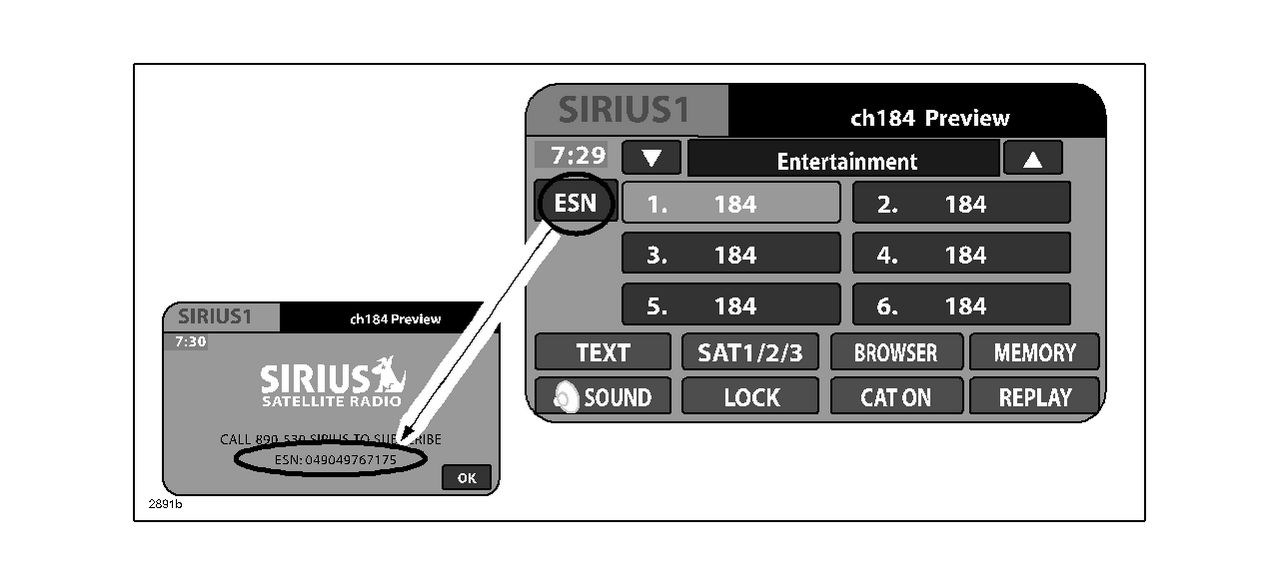
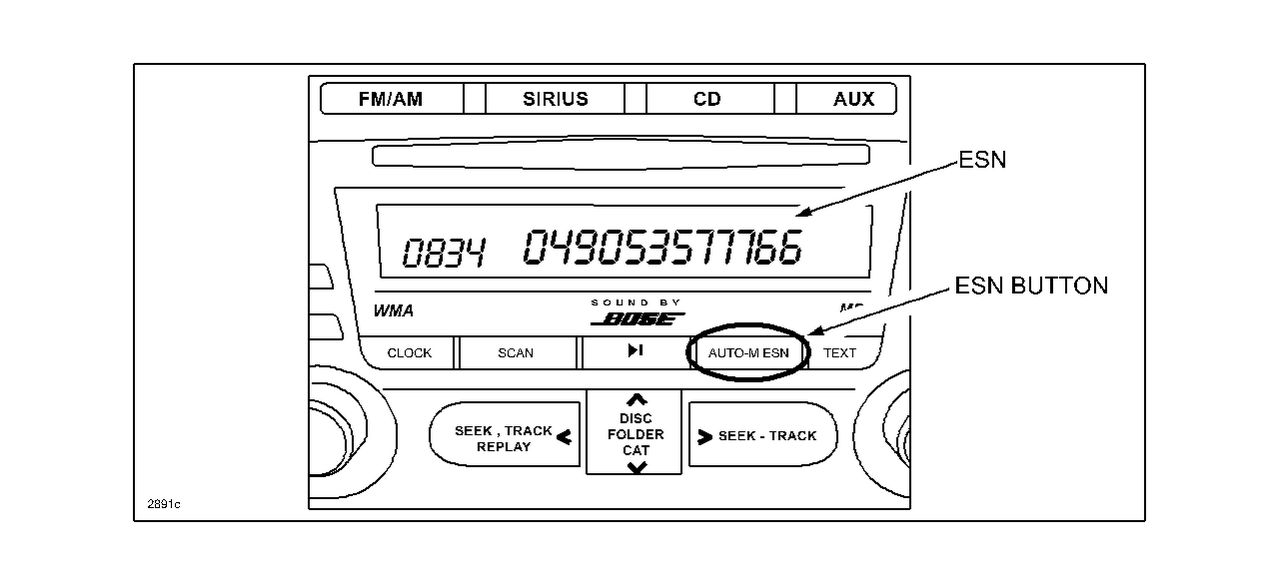
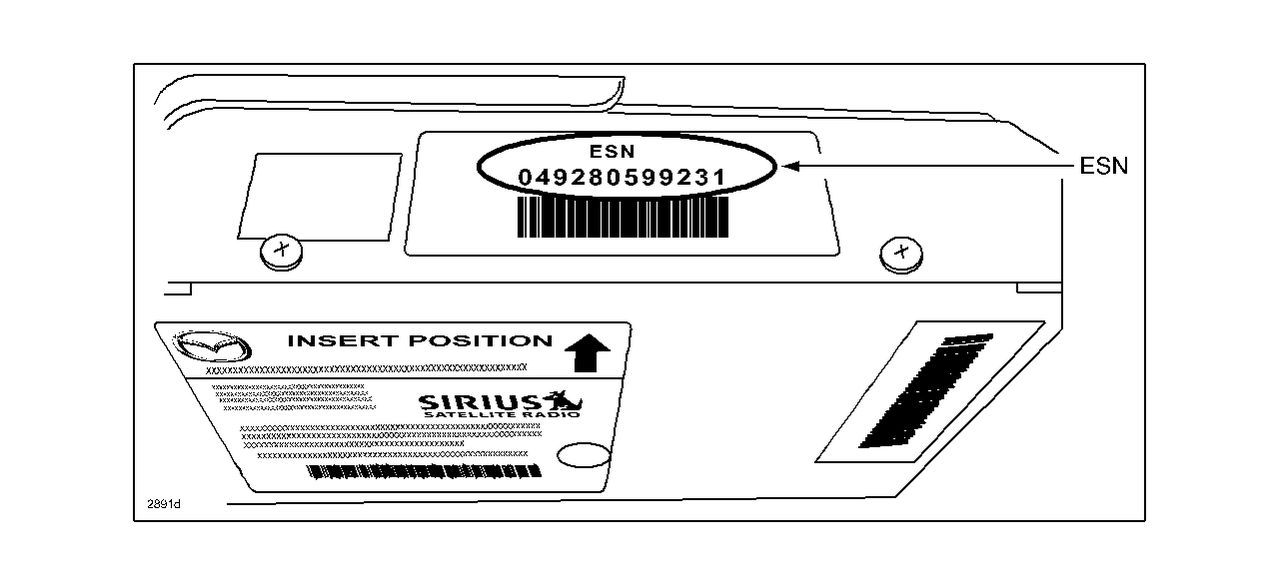
- Record both old and new satellite radio unit IDs. Refer to “DISPLAYING THE SIRIUSXM RADIO ID (ESN).”
- Old unit ID ______________________________________.
- New unit ID _____________________________________.
- Replace/Swap the SiriusXM SATELLITE RADIO UNIT or MAZDA CONNECT TUNER AMP UNIT (TAU). Refer to MS3 online instructions or Workshop Manual.
- Park the vehicle outside in a clear view of the sky.
- Use a cell phone to contact SiriusXM Dealer Support at 1-800-852-9696. Inform the agent:
- Provide the SiriusXM Dealer Support Agent with the old Radio ID and ask them to transfer the service on this radio to the new/replacement Radio. (The Radio ID will either be 8 alphanumeric characters or 12 digits depending on vehicle model and/or year. Refer to the section below “DISPLAYING THE SIRIUSXM RADIO ID (ESN) for details.”
- Ask the SXM Dealer Support Agent to send an activation signal to the new radio and confirm the SAT radio is active (a signal refresh can also be achieved (if necessary) by entering in the Radio ID into the following url: www.siriusxm.com/oemrefresh
NOTE: Vehicle must be parked outside in a clear view of the sky.
DISPLAYING THE SIRIUSXM RADIO ID (ESN)
NOTE: For model-specific procedures, refer to the Owner’s Manual section 6 “Interior Comfort.”
There are several ways to find the SiriusXM satellite radio ID. Below are some examples:
- For most radios, the radio ID (ESN) will display when tuning to channel 0.
| MAZDA CONNECT | Other |
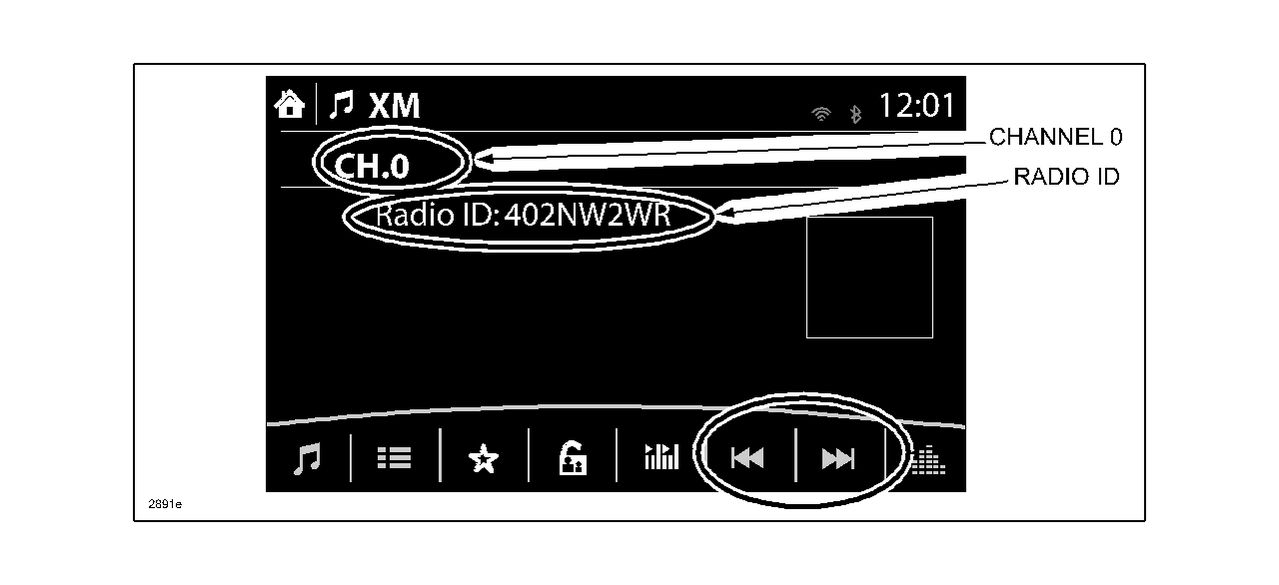 |
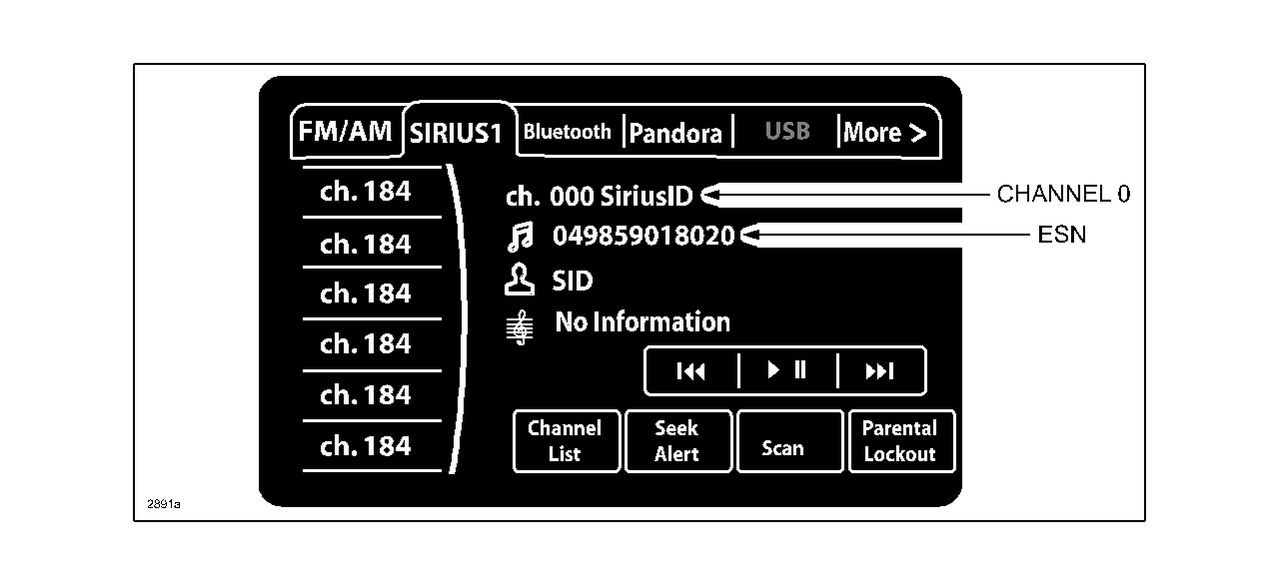 |
- Some radios will display the radio ID (ESN) using the “Menu” function.

SiriusXM SXPL1V1 Onyx Plus Satellite Radio with Vehicle Kit – Easy to Install, Enjoy SiriusXM on Your Existing Car Stereo with This Dock and Play Radio
- Plays Siriusxm Through Existing Vehicle Stereo With Easy Diy Installation
- Full Color Display Shows Program & Channel Information, Album Art, Channel Logos & Graphics
- Plays At Home, Office, Outdoors Or In Additional Vehicles With Just 1 Subscription
- Allows Browsing Other Channels While Listening To Current One
Portable Speaker Dock (SXSD2) | SiriusXM
- SPEAKER ARRAY - 2.1 system with separate tweeters, midrange speakers and a powerful subwoofer
- PORTABILITY - A fold away handle and an antenna cradle make it easy to take anywhere
- REMOTE CONTROL - Control your radio and docking station with the included remote
- INPUTS - Headphone jack for private listening and a aux in jack to allow for other MP3 players to be used
- COMPATIBILITY - SiriusXM Onyx Plus, SiriusXM Edge, XM Onyx, XM Onyx EZ, XM XpressRCI, XpressRC, Xpress R, Xpress, XpressEZ, Sirius Sporster 5, Sirius Starmate 8, Starmate 5, Starmate 4, Starmate 3, Sirius Stratus 7, Stratus 6, Stratus 5, Stratus 4, & Stratus 3
Sale


SiriusXM- XEZ1V1 Onyx EZ Satellite Radio with Vehicle Kit- Black
- Hear SiriusXM through your existing vehicle stereo with easy, do-it-yourself installation. Includes PowerConnect Vehicle Kit.
- Easy-to-read blue display allows you to view artist name, song or program title and channel information at the same time.
- Browse what's playing on other channels while listening to the current one, Store up to 10 of your favorite channels for one-touch access.
- Easily lock and unlock channels with mature content.
- One-Touch Jump to traffic and weather for the city of your choice, or back to your previous channel.
This product presentation was made with AAWP plugin.