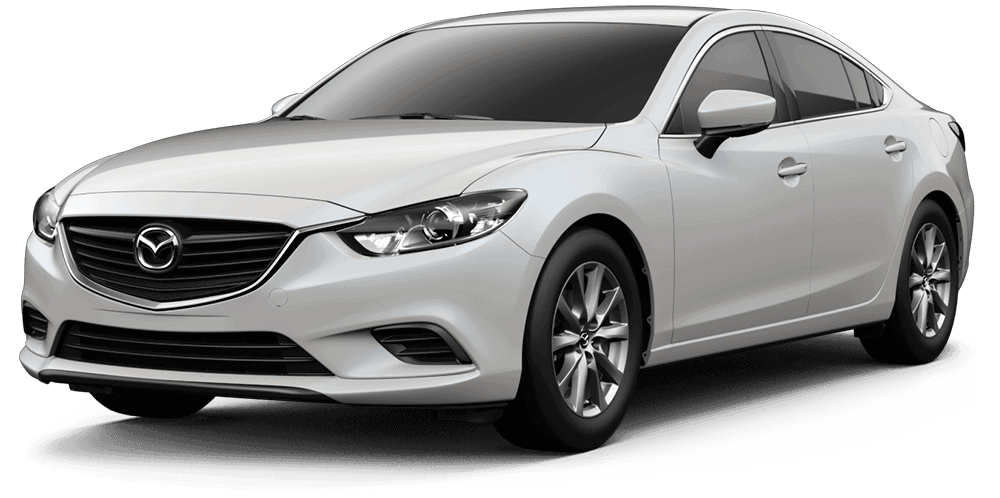
| Subject: M-Tips No.: MT-003/17 MULTI-MODEL (WITH MAZDA CONNECT) – NAVIGATION SYSTEM SD CARD CAUTION (UPDATE) | M-Tips No.: MT-003/17 |
| Last Issued: |
DESCRIPTION
Article Notes
| Previous M-TIPs: | Date(s) Issued: |
| MT-007/16 | 2016 |
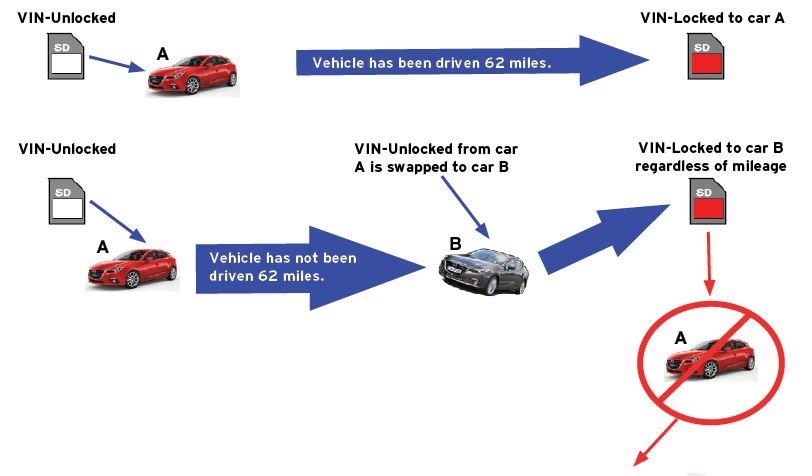
When installing a navigation SD card, confirm that the card is unlocked. Also, Mazda Does Not Recommend swapping navigation system SD cards from one vehicle to another for testing. If swapped, the SD card that is installed into the other vehicle becomes “linked” to the VIN of that vehicle.
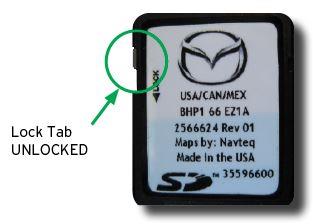
SD Card Installation Caution Set lock tab to “UNLOCKED” position before inserting SD Card.
Note
- Only insert or remove the SD card with the ignition switch OFF.
- If the SD card is installed with the tab at the “LOCK” side, the navigation system will not operate.
SD Card Swapping Caution
The SD card is VIN-locked the instant the card is inserted into a vehicle with 62 miles or more.
Note
If a SD card with VIN-locked condition is installed to another vehicle, there will be an error message “Invalid SD Card” on the center display.
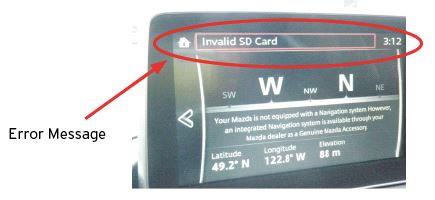
- Error message may be displayed when SD Card is updated or replaced.The error message “Invalid SD Card” is displayed on the center display when there is a malfunction (as mentioned previously, unauthorized modification, hard core failure etc.) with the SD card.
This error message may also be displayed when the SD card is updated or replaced. The cause may be the CMU not reading the SD card. As a countermeasure, put the CMU into a sleeping condition using the following procedure.
Procedure to set CMU into sleeping condition
- Verify the error message.
- Turn the ignition “OFF”.
- Exit the vehicle with key and lock the door.
- Wait 5 minutes.
- Turn the ignition to “ACC” and verify that the message is no longer displayed.
- Data transfer procedure when replacing SD card with a new one.
Follow the below procedure in order to properly transfer the initial data (date, VIN information etc.) to the new SD card.
(a) Park the vehicle in a location where GPS reception is available. This is necessary for the start of initial data transfer.
Note: Confirm if GPS signal is available.
In the vehicle condition with no SD card being installed, turn the ignition ON and select the Navigation. If values for the latitude, longitude and elevation positions are displayed on the compass screen as shown in the figure, GPS reception is currently available.
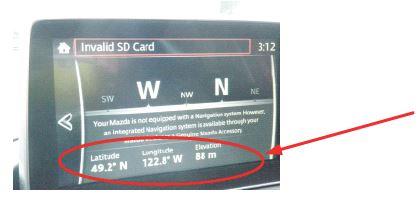
If position values are displayed, it means GPS reception currently is available. If not available, (- – -) is displayed.
(b) If GPS reception has been confirmed, turn the ignition OFF.
(c) Insert a new SD card, turn the ignition ON and select the Navigation. Verify that a map with the current GPS position marker (vehicle marker) is displayed. Wait in this condition at least for 2 minutes until transfer of the initial data is complete. If possible, test drive the vehicle and verify the icon follows the roads correctly.
- Diagnostic procedure for the SD card. When SD card failure is suspected with symptoms such as “Navigation will not work properly” or “Compass screen appears instead of navigation screen”, follow steps 1- 3 below.
Step 1
With the ignition switched off, remove the SD card from the slot and make sure that the lock tab is set at the “UNLOCKED” side. Insert the card to the slot and check if the issue still is present. If the concern still exists, proceed to next step.
Step 2
Put the CMU into a sleeping condition by the following procedure.
a. Turn the ignition to “OFF”.
b. Get out of the vehicle having the key and lock the door.
c. Wait for 5 minutes.
d. Turn the ignition to “ACC” and verify that the concern disappeared. If the concern still exists, proceed to next step.
Step 3
Using Mazda Toolbox, check if the SD card is locked to another VIN. If you are prompted to update Mazda Toolbox, do that first.
NOTE:
- Mazda Toolbox is a free PC application to update navigation map for MAZDACONNECT which can be downloaded from the MyMazda.com Website and installed.
- If the SD card cannot be read, remove it and reinstall it. The SD card usually needs to be inserted after starting Mazda Toolbox.
- If you restart Mazda Toolbox for whatever reason and do not R&R the SD card, Mazda Toolbox may not detect the SD card.
- If SD card is completely blank, replace it**. It is likely that the customer tried to format the SD card when trying to update it. Please review the process with the customer to avoid a return visit for the same concern.
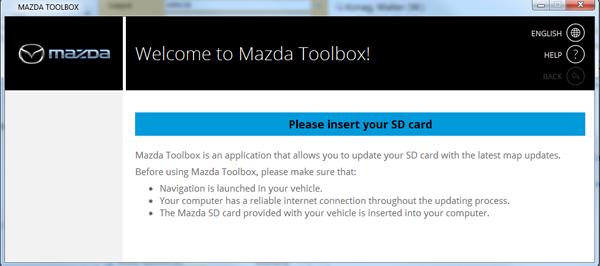
If the Toolbox has been installed before June 8, 2016 and is not updated to Version 4 or later since then, first update it to Version 4 or later.
If you are not sure whether your Toolbox is Version 4 or later, confirm it by the screen below just after starting the toolbox.
NOTE:
If MAZDA TOOLBOX is not able to read the SD card,replace the SD card with a new one*.
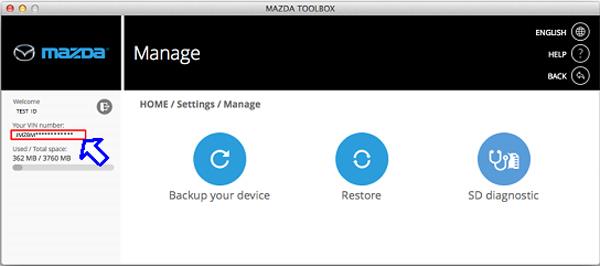
Compare if the VIN on the screen is same as the VIN of the concerned vehicle.
If these VINs do not match or the SD card has been locked to other vehicle and cannot be used on the concerned vehicle with error message “Invalid SD Card” on the center display.
In such a cases, there are two possibilities: (1) mixed-up with a SD card valid to another vehicle – Find the valid SD card for the concerned vehicle.
(2) SD card was mistakenly inserted to other vehicle and locked for that vehicle. – Replace the SD card with a new one***.
If VIN matches with the concerned vehicle, proceed to next step.
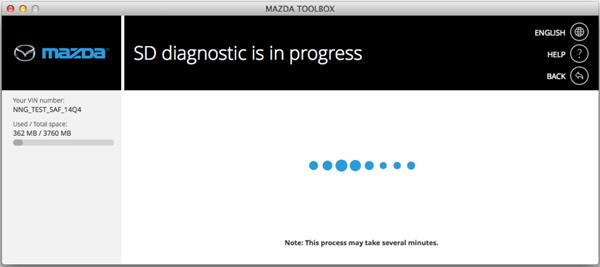
Go to Setting, select “SD diagnostic”.
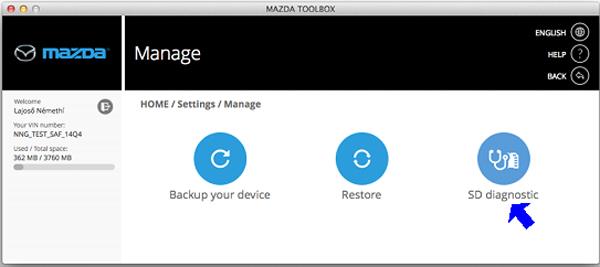
Wait while the card is being analyzed, note this may take several minutes.
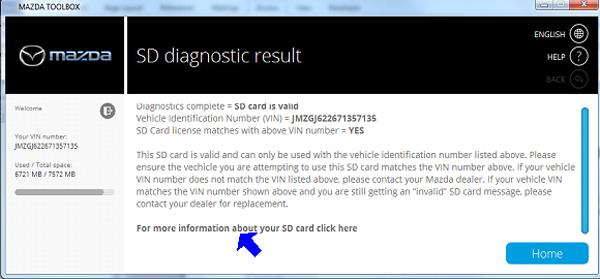
| MAZDA CONNECT Error Message | SD Card diagnostic | VIN Information | Dealer Action |
| Invalid SD Card | SD Card is valid | VIN matches the customer’s vehicle | Update the SD card for the customer |
| Invalid SD Card | SD Card is valid | VIN does not match the customer’s vehicle | Replace the SD card with a new one*** |
For additional SD diagnostic result information, click ”For more information about your SD card click here.”
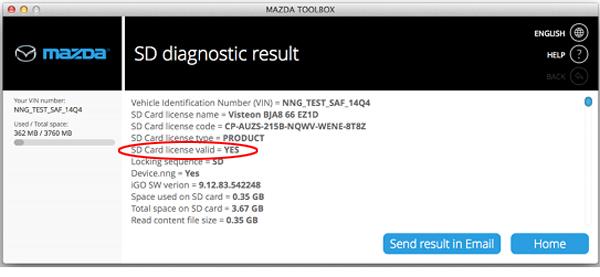
| SD Card license valid = | Dealer Action |
| Yes | Update the SD card for the customer |
| No | Replace the SD card with a new one* |
Warranty Information
* In this case,SD card replacement will be covered under Mazda’s New Vehicle Limited Warranty term.
** In this case, SD card replacement will not be covered under Mazda’s New Vehicle Limited Warranty term; however, the case can be reviewed for possible goodwill using DSA or District Service Manager authorization.
***In this case,SD card replacement is not covered under Mazda’s New Vehicle Limited Warranty term due to the fact the SD card does not match the vehicle VIN.
| MAZDA | CX-3 | 2016-2017 |
| MAZDA | CX-5 | 2016-2017 |
| MAZDA | CX-9 | 2016-2017 |
| MAZDA | MAZDA2 | 2016-2017 |
| MAZDA | MAZDA3 | 2014-2017 |
| MAZDA | MAZDA6 | 2016-2017 |
| MAZDA | MX-5 | 2016-2017 |
MT-003-17
MT-003/17
MTI1111
MTI1111
MTI1111

- 【Updated Navigation SD Card for USA, Canada & Mexico】This updated navigation SD card comes pre-loaded with the latest offline navigation map for the United States, Canada, and Mexico. No cell signal needed—enjoy extensive, self-contained map data covering millions of points of interest, including hotels, gas stations, restaurants, pet stores. Whether you’re navigating busy city traffic, rural backroads, or remote areas, this navigation memory card delivers full, reliable offline guidance that never leaves you stranded when the signal drops.
- 【Vehicle Compatibility & Plug-and-Play Simplicity】This navigation SD card is built for a seamless fit with select Mazda models equipped with the factory Connect system, including 2025-2026 Mazda 3 CX-30, CX-50, CX-70, and 2024-2026 MX-5. Installation is straightforward: with the engine off, insert the card into your car’s SD slot. Upon ignition, the system auto-activates and integrates securely—no dealer visit required.
- 【Heads-Up Display (HUD) for Safer Driving】A superior advantage over smartphone navigation apps. This Mazda SD navigation card enables turn-by-turn directions to beam directly onto your Mazda’s Heads-Up Display (HUD) screen. This navigation memory card Keep your eyes on the road and reduce distracted driving, especially helpful during high-speed freeway interchanges or complex city traffic.
- 【Important Installation Note & VIN Lock】The mazda navigation map is designed to be locked to one vehicle’s VIN permanently; it cannot be transferred to another car once inserted. For first-time use, the system may need 1-2 hours or an overnight restart to fully synchronize GPS signals and complete background indexing. Please be patient during this one-time initialization process. Do not attempt to update the map data manually or insert the card into a computer to avoid permanent damage.
- 【What's Included】You will receive the KR9D66EZ1B Navigation Card, ready to use. To reduce paper waste, we only include the navigation SD card in the package. A digital user manual is available upon request, and we also offer free VIN check services to ensure this card fits your vehicle perfectly. Just send us a message and we will reply within 24 hours.

- 【Reliable Offline GPS Navigation】: Enable built-in offline navigation for the United States, Canada, and Mexico directly through your vehicle’s factory infotainment system. Ideal for road trips, tunnels, mountain highways, rural areas, and locations with weak cell coverage. Designed as a dependable backup navigation solution alongside CarPlay or smartphone apps
- 【Compatible Mazda Models】: Compatible with select Mazda vehicles equipped with the factory Mazda Connect system and SD card slot: CX-30 (2025–2026), Mazda 3 (2025–2026), CX-50 (2025–2026), CX-70 (2025–2026), MX-5 (2024–2026), CX-90 (2026)
- 【VIN Compatibility Assistance & Free exchange Support】: Not sure which navigation card your vehicle requires? Message us with your VIN for compatibility verification before purchase. Ordered the wrong model? If a compatible model is available, we offer a one-time free exchange within 2 months of purchase
- 【Simple Plug-and-Play Activation】: No dealer visit or complicated setup required. Insert the SD card into the vehicle’s SD slot with the engine off, then restart the vehicle to activate factory navigation automatically
- 【Factory Navigation Features & HUD Support】: Works directly through your vehicle’s factory infotainment system for a clean OEM-style navigation experience without extra screens or phone mounts. Supports voice-guided navigation and HUD features on compatible vehicles
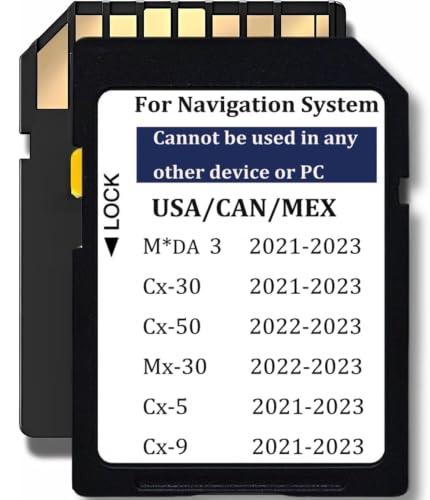
- Mazda navigation memory card Maps TD2K66EZ1B , Fit for Mazda 3,CX-5,CX-9,CX-30 (2021-2023),Cx-50,MX-30 (2022-2023), 【2021 Mazda 3 / CX-30 models require VIN verification】: 1. 2021 - Mazda 3: Japan Built Vehicle: JM1BP**400001 and higher -TD2K66EZ1B. Mexico Built Vehicle: 3MZBP**250004 and higher -TD2K66EZ1B. 2. 2021 - CX-30: 3MVDM**300002 and higher -TD2K66EZ1B
- USA / Canada / Mexico (North America), Compatible with Cx-5 2021 – 2023 (Works only with 10,25 inches / 26 cm display with Connect System 2) Compatible with Cx-9 2021 – 2023 (Works only with 10,25 inches / 26 cm display with Connect System 2)
- Map update year: In 2023. Each map is built upon an initial foundational database,and subsequent updates are made on top of this base every year. The database for this map is from 2021, hence some cards may display that particular database year. However, the navigation card's map is updated to 2023. Thank you for your understanding.
- Please Note: The Navi card can be used only in one car, once it is installed to the navigation system for the first time, it will be locked with cars VIN. Navigation system Navi cards cannot be used/switched from one vehicle to another.
- Important notes: The map version preloaded on our navigation card is already the latest official version available among all OEM suppliers at present . The map data of the Navi card cannot be updated. The packaging only includes one navigation card. No manual

- Navigation memory Card KMV666EZ1C Compatible with Maz*da 2016-2020 CX-5 / CX-9, 2014-2018 Maz*da 3, 2016-2023 Maz*da 6 / CX-3 / MX-5, Upgraded USA/CAN/MEX Maps -10 Years Warranty
- Compatible with below Vehcile Models KMV666EZ1C , Maz*da 3 (2014-2018) Maz*da 6 (2016-2023) Cx-3 (2016-2023) Mx-5 (2016-2023) Cx-5 2016-2020 (works only with 7.5-8.5 inches display with Connect System 1) Cx-9 2016-2020 (works only with 7.5-8.5 inches display with Connect System 1)
- Please Check Details Carefully Compatible with: CX-5, CX-9 (2016–2020)(Connect System 1 Only, 7.5–8.5” Display); Mazda 3 (2014–2018); CX-3, Mazda 6, MX-5 (2016–2023). Not sure? Send us your VIN—we’ll help confirm before purchase
- Please Note: This map is for North America and Mexico only. Please note that this navigation card is only compatible with the following vehicle models. If you are unsure, please send us your VIN and we will happily check for you
- Please Note: The Navi card can be used only in one car, once it is installed to the navigation system for the first time, it will be locked with cars VIN. Navigation system Navi cards cannot be used/switched from one vehicle to another

- 【Reliable Offline Navigation】: Activate your vehicle’s built-in nav system with offline GPS maps for the U.S., Canada, and Mexico. Ideal for road trips, national parks, and areas with weak cell signal. Use as a backup alongside CarPlay/Android Auto — no phone battery drain or data usage
- 【Vehicle Compatibility & Free VIN Check】: Compatible with Mazda Connect/MZD Connect systems, including 2024–2025 CX-5, 2023–2025 CX-90, 2024 CX-30, and 2024 Mazda 3. Unsure about your trim? Send us your VIN for free compatibility verification before ordering. Ordered the wrong model? We provide a one-time free exchange within 2 months (limit 1 per order, compatible model required)
- 【Simple Plug-and-Play Setup】: No dealer visit, software download, or complex setup. Just insert the SD card into the slot with the engine off, then restart your vehicle. Built-in navigation activates automatically through your factory infotainment system
- 【Enhanced Driving Features & HUD Support】: Supports Mazda Active Driving Display (HUD) for turn-by-turn guidance, speed limits, and road sign recognition on compatible vehicles. Factory voice-command navigation also supported where equipped. Specific features vary by model, trim, hardware, and system configuration
- 【One-Vehicle Activation】: Like many factory-installed navigation systems, the SD card links to one vehicle after activation and cannot be transferred between vehicles. A new compatible card is required for a future vehicle
This product presentation was made with AAWP plugin.