| Subject:
HANDS-FREE BLUETOOTH MODULE AND/OR TEXT MESSAGING TROUBLESHOOTING PROCEDURE | Bulletin No: 09-009/16 |
| Last Issued: 05/10/2016 |
BULLETIN NOTE
This bulletin supersedes the previously issued bulletin(s) listed below. The changes are noted in Red beside the change bars.
| Previous TSBs: | Date(s) Issued: | Previous TSBs: | Date(s) Issued: |
| 09-009/16 | 02/17/16 | 09-014/12 | 03/16/12 and 08/10/12 |
| 09-039/14 | 09/09/14 | 09-008/11 | 02/23/11 |
| 09-019/13 | 06/14/13 | 09-007/10 | 02/08/10 |
| 09-042/08 | 12/23/08 |
APPLICABLE MODEL(S)/VINS
| 2016 CX-3 | 2007-2016 CX-9 | 2009-2016 Mazda6 |
| 2013-2016 CX-5 | 2010-2016 Mazda3 | 2009-2016 MX-5 |
| 2009-2012 CX-7 | 2008-2015 Mazda5 | 2009-2011 RX-8 |
- Applies only to models equipped with Hands-Free Bluetooth
DESCRIPTION
Some vehicles may exhibit BLUETOOTH hands-free and/or text messaging related concerns.
To improve the handling of BLUETOOTH hands-free and/or text messaging customer concerns, Mazda created a special service and parts exchange program as of February 2010.
Customers experiencing related concerns should have their vehicle and/or device inspected according to the
following procedure.
REPAIR PROCEDURE
- Verify customer concern.
- Verify that the customer has provided the correct phone or device.
- Confirm the device compatibility by web or smartphone.
| Go to: | |
| Web | www.MazdaUSA.com/Bluetooth |
| Smartphone | MyMazda app; press MAZDA CONNECT |
NOTE:
- When checking compatibility, be aware that phones may be approved for some functions but not for others.
- Scroll down to make sure there are no red X’s in the compatibility list.
- Check the phone model number; compatability can vary by the phone company version.
- Check MS3 Online (Mazda Service Support System) for related service bulletins and service alerts.
- If the steps above did not resolve the customer’s concern, contact Mazda Hands-Free System Customer Care at (800) 430-0153 to review the concern further.
NOTE:
- If for any reason there was a mis-communication regarding the concern written on the RO, the Mazda Hands-Free System Customer Care representative can clarify it.
- If Mazda Hands-Free System Customer Care has provided you a case number, they have determined there could be a problem with the hands-free module. However, a case number does not mean automatic module replacement. Proceed to next step.
- Troubleshoot the vehicle according to the instruction on MS3 online or the Workshop Manual (Section 09 > Body and Accessories > On-Board Diagnostics).
- If the cause cannot be determined through MS3 online or the Workshop Manual, contact the Mazda Technical Hotline for assistance and support.
NOTE: The Mazda Technical Assistance Hotline does not provide authorization for warranty or parts ordering.
- If it is determined that a replacement hands-free module is required, proceed to next step.
NOTE: Provide the case number to your parts dept. so they can order the part.
- Replace the hands-free module according to the instruction on MS3 online or the Workshop Manual (Section 09 > Body and Accessories > Entertainment > Bluetooth Unit Removal/Installation).
- Verify the repair.
PARTS INFORMATION
Review the points below when ordering a hands-free Bluetooth unit:
NOTE:
- Use the Mazda Hands-Free System Customer Care case number to place the order with United Radio for the part exchange.
- It is not necessary to call United Radio directly, place the order online, via the United Radio Website.
| Access the United Radio Website using either one of the links below: | |
| 1 | Go to: https://portal.mazdausa.com/dealershome/service_parts/dag/exchange_page_1.htm Then select “United Radio Website” and log in. |
| OR | |
| 2 | Go to: https://Dealers.mazdausa.com/
Then select “Parts and Accessories”, “Parts”, “Exchange Central”, then select “United Radio Website” and log in. |
WARRANTY INFORMATION
NOTE: For this TSB only, dealers may use actual time (up to a maximum of 0.9 hr.) to cover any necessary diagnostic time.
09-009/16
05/10/2016
09-009/16
02/17/2016

- 【Updated Navigation SD Card for USA, Canada & Mexico】This updated navigation SD card comes pre-loaded with the latest offline navigation map for the United States, Canada, and Mexico. No cell signal needed—enjoy extensive, self-contained map data covering millions of points of interest, including hotels, gas stations, restaurants, pet stores. Whether you’re navigating busy city traffic, rural backroads, or remote areas, this navigation memory card delivers full, reliable offline guidance that never leaves you stranded when the signal drops.
- 【Vehicle Compatibility & Plug-and-Play Simplicity】This navigation SD card is built for a seamless fit with select Mazda models equipped with the factory Connect system, including 2025-2026 Mazda 3 CX-30, CX-50, CX-70, and 2024-2026 MX-5. Installation is straightforward: with the engine off, insert the card into your car’s SD slot. Upon ignition, the system auto-activates and integrates securely—no dealer visit required.
- 【Heads-Up Display (HUD) for Safer Driving】A superior advantage over smartphone navigation apps. This Mazda SD navigation card enables turn-by-turn directions to beam directly onto your Mazda’s Heads-Up Display (HUD) screen. This navigation memory card Keep your eyes on the road and reduce distracted driving, especially helpful during high-speed freeway interchanges or complex city traffic.
- 【Important Installation Note & VIN Lock】The mazda navigation map is designed to be locked to one vehicle’s VIN permanently; it cannot be transferred to another car once inserted. For first-time use, the system may need 1-2 hours or an overnight restart to fully synchronize GPS signals and complete background indexing. Please be patient during this one-time initialization process. Do not attempt to update the map data manually or insert the card into a computer to avoid permanent damage.
- 【What's Included】You will receive the KR9D66EZ1B Navigation Card, ready to use. To reduce paper waste, we only include the navigation SD card in the package. A digital user manual is available upon request, and we also offer free VIN check services to ensure this card fits your vehicle perfectly. Just send us a message and we will reply within 24 hours.

- 【Reliable Offline GPS Navigation】: Enable built-in offline navigation for the United States, Canada, and Mexico directly through your vehicle’s factory infotainment system. Ideal for road trips, tunnels, mountain highways, rural areas, and locations with weak cell coverage. Designed as a dependable backup navigation solution alongside CarPlay or smartphone apps
- 【Compatible Mazda Models】: Compatible with select Mazda vehicles equipped with the factory Mazda Connect system and SD card slot: CX-30 (2025–2026), Mazda 3 (2025–2026), CX-50 (2025–2026), CX-70 (2025–2026), MX-5 (2024–2026), CX-90 (2026)
- 【VIN Compatibility Assistance & Free exchange Support】: Not sure which navigation card your vehicle requires? Message us with your VIN for compatibility verification before purchase. Ordered the wrong model? If a compatible model is available, we offer a one-time free exchange within 2 months of purchase
- 【Simple Plug-and-Play Activation】: No dealer visit or complicated setup required. Insert the SD card into the vehicle’s SD slot with the engine off, then restart the vehicle to activate factory navigation automatically
- 【Factory Navigation Features & HUD Support】: Works directly through your vehicle’s factory infotainment system for a clean OEM-style navigation experience without extra screens or phone mounts. Supports voice-guided navigation and HUD features on compatible vehicles
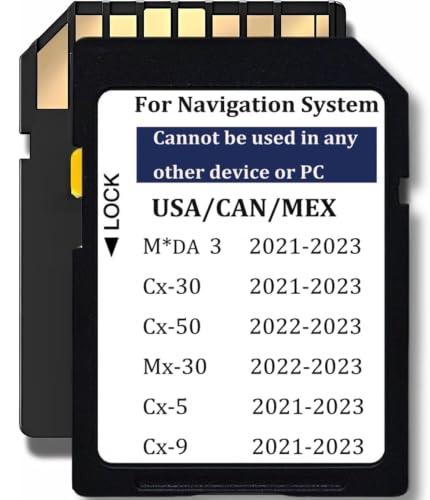
- Mazda navigation memory card Maps TD2K66EZ1B , Fit for Mazda 3,CX-5,CX-9,CX-30 (2021-2023),Cx-50,MX-30 (2022-2023), 【2021 Mazda 3 / CX-30 models require VIN verification】: 1. 2021 - Mazda 3: Japan Built Vehicle: JM1BP**400001 and higher -TD2K66EZ1B. Mexico Built Vehicle: 3MZBP**250004 and higher -TD2K66EZ1B. 2. 2021 - CX-30: 3MVDM**300002 and higher -TD2K66EZ1B
- USA / Canada / Mexico (North America), Compatible with Cx-5 2021 – 2023 (Works only with 10,25 inches / 26 cm display with Connect System 2) Compatible with Cx-9 2021 – 2023 (Works only with 10,25 inches / 26 cm display with Connect System 2)
- Map update year: In 2023. Each map is built upon an initial foundational database,and subsequent updates are made on top of this base every year. The database for this map is from 2021, hence some cards may display that particular database year. However, the navigation card's map is updated to 2023. Thank you for your understanding.
- Please Note: The Navi card can be used only in one car, once it is installed to the navigation system for the first time, it will be locked with cars VIN. Navigation system Navi cards cannot be used/switched from one vehicle to another.
- Important notes: The map version preloaded on our navigation card is already the latest official version available among all OEM suppliers at present . The map data of the Navi card cannot be updated. The packaging only includes one navigation card. No manual

- Navigation memory Card KMV666EZ1C Compatible with Maz*da 2016-2020 CX-5 / CX-9, 2014-2018 Maz*da 3, 2016-2023 Maz*da 6 / CX-3 / MX-5, Upgraded USA/CAN/MEX Maps -10 Years Warranty
- Compatible with below Vehcile Models KMV666EZ1C , Maz*da 3 (2014-2018) Maz*da 6 (2016-2023) Cx-3 (2016-2023) Mx-5 (2016-2023) Cx-5 2016-2020 (works only with 7.5-8.5 inches display with Connect System 1) Cx-9 2016-2020 (works only with 7.5-8.5 inches display with Connect System 1)
- Please Check Details Carefully Compatible with: CX-5, CX-9 (2016–2020)(Connect System 1 Only, 7.5–8.5” Display); Mazda 3 (2014–2018); CX-3, Mazda 6, MX-5 (2016–2023). Not sure? Send us your VIN—we’ll help confirm before purchase
- Please Note: This map is for North America and Mexico only. Please note that this navigation card is only compatible with the following vehicle models. If you are unsure, please send us your VIN and we will happily check for you
- Please Note: The Navi card can be used only in one car, once it is installed to the navigation system for the first time, it will be locked with cars VIN. Navigation system Navi cards cannot be used/switched from one vehicle to another

- 【Reliable Offline Navigation】: Activate your vehicle’s built-in nav system with offline GPS maps for the U.S., Canada, and Mexico. Ideal for road trips, national parks, and areas with weak cell signal. Use as a backup alongside CarPlay/Android Auto — no phone battery drain or data usage
- 【Vehicle Compatibility & Free VIN Check】: Compatible with Mazda Connect/MZD Connect systems, including 2024–2025 CX-5, 2023–2025 CX-90, 2024 CX-30, and 2024 Mazda 3. Unsure about your trim? Send us your VIN for free compatibility verification before ordering. Ordered the wrong model? We provide a one-time free exchange within 2 months (limit 1 per order, compatible model required)
- 【Simple Plug-and-Play Setup】: No dealer visit, software download, or complex setup. Just insert the SD card into the slot with the engine off, then restart your vehicle. Built-in navigation activates automatically through your factory infotainment system
- 【Enhanced Driving Features & HUD Support】: Supports Mazda Active Driving Display (HUD) for turn-by-turn guidance, speed limits, and road sign recognition on compatible vehicles. Factory voice-command navigation also supported where equipped. Specific features vary by model, trim, hardware, and system configuration
- 【One-Vehicle Activation】: Like many factory-installed navigation systems, the SD card links to one vehicle after activation and cannot be transferred between vehicles. A new compatible card is required for a future vehicle
This product presentation was made with AAWP plugin.