BULLETIN NOTE
This bulletin supersedes the previously issued bulletin(s) listed below. The changes are noted below in Red beside the change bars.
| Previously Issued TSBs: | Date(s) Issued |
| 01-016/15 | 08/04/15 |
APPLICABLE MODEL(S)/VINS
2014-2015 Mazda3 (Japan built) vehicles with VINs lower than JM1BM******267077 (produced before March 30, 2015)
2014-2015 Mazda3 (Mexico built) vehicles with VINs lower than 3MZBM******207478 (produced before April 1, 2015)
2014-2016 Mazda6 vehicles with VINs lower than JM1GJ******425952 (produced before April 8, 2015)
2014-2015 CX-5 (2.5L A/T only)
2016 CX-5 vehicles with VINs lower than JM3KE******656820 (produced before April 8, 2015)
DESCRIPTION
Some vehicles may experience the check engine light on with DTC P0421:00 (Catalytic converter system) without experiencing poor engine performance or misfire (Mitsubishi PCM only).
This is caused by improper control logic of the PCM that may detect false error of the A/F sensor, resulting in false detection of P0421. To correct the problem, the control logic of the PCM has been changed. Catalyst monitor function explanation
- The PCM monitors the oxygen storage amount proportional to catalytic converter purification characteristic.
- The PCM starts to monitor after recovery (fuel injection starts) from fuel cut control.
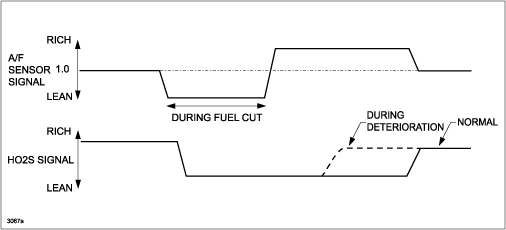
- The PCM temporarily changes the target air/fuel ratio to rich at fuel cut recovery, and detects the response time until the HO2S output signal outputs the voltage on the rich side.
- If the catalytic converter purification characteristic deteriorates, the amount of the time until the HO2S detects the voltage on the rich side is shorter compared to the normal purification characteristic as shown. The PCM detects a catalytic converter malfunction using this characteristic.
REPAIR PROCEDURE
Verification of Condition of Warm Up Three-Way Catalytic Converter (WU-TWC)
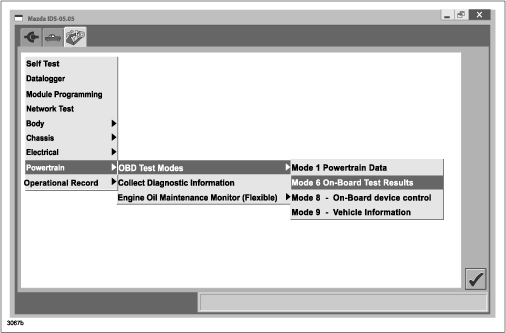
- Verify the condition of the Warm Up Three-Way Catalytic Converter (WU-TWC) by checking the value “Catalyst monitor bank 1” on MODE6 with M-MDS or Scan Tool.
- Go to Powertrain => OBD Test Modes => Mode6 On Board Test Results
-
- Go to Catalyst monitor bank 1 => Equivalence Oxygen Storage Component (OBDMID: 21, Test ID: 82)
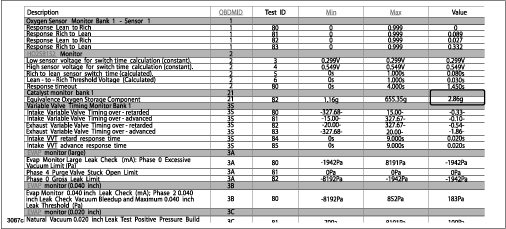
- If the value is “equal to 0”, clear the DTC and go to PCM Reprogramming.
- If the value is “equal to 2 or higher”, clear the DTC and go to PCM Reprogramming.
- If the value is “between 0 and 2”, follow these steps:
-
- Clear the DTC and reprogram the PCM.
- Disconnect the negative battery cable to clear the PCM memory (at least 1 min.)
- Go into the “DRIVE MODE”:
- Drive the vehicle at about 50mph for 15min.
- Decelerate to 25 mph, and shift into M-Mode, 3rd gear.
- Accelerate to 40 mph while holding the transmission in 3rd gear.
- Stay at 40 mph for 3 seconds, then release the accelerator pedal and decelerate to 25 mph.
- Accelerate to 40 mph again while holding the transmission in 3rd gear.
- Stay at 40 mph for 3 seconds, then release the accelerator pedal and decelerate to 25 mph again.
- Repeat steps b-f (acceleration and deceleration) at least 10 times.
- Check the value “Catalyst monitor bank 1” on MODE6 with M-MDS.
- If the value is “equal to 1 or higher than 1”, WU-TWC can be judged as OK.
- If the value is “less than 1”, WU-TWC should be deteriorated. Refer to MS3 online instructions for DTC P0421:00 or Workshop manual section 01-01.
PCM Reprogramming
- Using IDS 99.05 or later software, reprogram the PCM to the latest calibration (refer to “Calibration Information” table) by following the “Module Reprogramming” procedure.
NOTE:
- Verify the current PCM file name in the vehicle by the log view screen. If it is the same as found in the chart below (or later), it is not necessary to reprogram the PCM.
- Always update the IDS tool first, then follow the on-screen instructions to download the calibration file for PCM reprogramming.
- Refer to “Service Caution for reprogramming” on MS3 IDS Page.
- After reprogramming, verify the file name matches with the chart below.
NOTE:
- Always update the IDS tool first, then follow on-screen instructions to download the needed calibration file for PCM reprogramming.
- It is not necessary to remove any fuses or relays during PCM reprogramming when the IDS screen prompts you to do so. You may accidentally stop power to one of the PCM terminals and cause the PCM to be blanked, or you may receive error messages during the IDS reprogramming procedure.
- IDS shows the calibration part numbers after programming the PCM.
- Please be aware that PCM calibration part numbers and file names listed in any Service Bulletin may change due to future releases of IDS software, and additional revisions made to those calibrations for service related concerns.
- When reprogramming a PCM, IDS will always display the “latest” calibration P/N available for that vehicle. If any calibration has been revised/updated to contain new information for a new service concern/issue, it will also contain all previously released calibrations.
- Start/Stop button vehicles only: DO NOT press the start/stop button during the reprogramming process.
- When performing this procedure, we recommend using the “Power Supply” mode in the Battery Management System to keep the vehicle battery up to capacity. If a different charger is used, make sure it does not exceed 20 AMPS. If it exceeds 20 AMPS, it could damage the VCM.
- After performing the PCM reprogramming procedure, clear DTCs.
- After clearing DTCs, start the engine and confirm that no warning lights stay on.
NOTE:
- If any DTCs should remain after performing DTC erase, diagnose the DTCs using MS3 online instructions or Workshop Manual section 01-02.
- After PCM reprogramming, it is no longer necessary to road test the vehicle to “relearn” KAM (Keep Alive Memory).
CALIBRATION INFORMATION
2014-2015 Mazda3 (Japan built) for VINs starting with JM1
| Engine | Emissions | Transmission | File Name | Note |
| 2.0L | Calif (PZEV) | M/T | PELC-188K2-C | |
| A/T | PELA-188K2-C | |||
| Calif (ULEV) | M/T | PE18-188K2-E | ||
| A/T | PE19-188K2-D | |||
| Fed | M/T | PE5J-188K2-E | ||
| A/T | PE5K-188K2-D | |||
| 2.5L | Calif (PZEV) | M/T | PYBE-188K2-C | Improved from B-level |
| A/T | PY08-188K2-D | w/out i-ELOOP | ||
| PY2P-188K2-F | w/ i-ELOOP (to Feb 1, 2015) | |||
| PYFG-188K2-A | w/ i-ELOOP (from Feb 1, 2015) | |||
| Fed | M/T | PYBG-188K2-B | ||
| A/T | PY2J-188K2-D | w/out i-ELOOP | ||
| PY2R-188K2-F | w/ i-ELOOP (to Feb 1, 2015) | |||
| PYFH-188K2-A | w/ i-ELOOP (from Feb 1, 2015) | |||
| Mexico | M/T | PYBJ-188K2-B | ||
| A/T | PY8E-188K2-C |
2014-2015 Mazda3 (Mexico built) for VINs starting with 3MZ
| Emissions | Transmission | File Name | Note |
| Calif (PZEV) | M/T | PELG-188K2-C | Improved from B level |
| A/T | PELE-188K2-C | Improved from B level | |
| Calif (ULEV) | M/T | PEDG-188K2-D | Improved from C level |
| A/T | PEDH-188K2-C | Improved from B level | |
| Fed | M/T | PEDJ-188K2-D | Improved from C level |
| A/T | PEDK-188K2-C | Improved from B level | |
| Mexico | M/T | PEGN-188K2-B | |
| A/T | PEGR-188K2-B |
2014-2015 Mazda6
| Emissions | Transmission | File Name | Note |
| Calif (PZEV) | M/T | PYXS-188K2- | Old file name: PY1D-188K2-* |
| A/T | PYXT-188K2- | Old file name: PY1E-188K2-* | |
| PYXW-188K2- | w/ i-ELOOP
Old file name: PY8G-188K2-* | ||
| Calif (ULEV) | M/T | PY8A-188K2-D | |
| A/T | PY8B-188K2-D | ||
| PY1G-188K2-H | w/ i-ELOOP | ||
| Fed | M/T | PYXX-188K2- | Old file name: PY1H-188K2-* |
| A/T | PYXZ-188K2- | Old file name: PY1J-188K2-* | |
| PZY1-188K2- | w/ i-ELOOP
Old file name: PY2E-188K2-* | ||
| Mexico | M/T | PZZ4-188K2- | Old file name: PY4J-188K2-* |
| A/T | PZZ5-188K2- | Old file name: PY4K-188K2-* |
2016 Mazda6
| Emissions | Transmission | File Name | Note |
| Calif (PZEV) | M/T | PY9S-188K2-C | |
| A/T | PY9V-188K2-C | ||
| PY9X-188K2-C | w/ i-ELOOP | ||
| Fed | M/T | PYAB-188K2-B | |
| A/T | PYAD-188K2-B | ||
| PYAF-188K2-B | w/ i-ELOOP | ||
| Mexico | M/T | PYBA-188K2-B | |
| A/T | PYBC-188K2-B | w/ i-ELOOP |
2014-2015 CX-5
| Engine | Emissions | Transmission | Drive | File Name | Notes |
| 2.0L | Mexico | A/T | 2WD | PEBG-188K2-D | |
| 2.5L | Calif | A/T | 2WD | PYXH-188K2- | Old file name: PY09-188K2-* |
| 4WD | PYXJ-188K2- | Old file name: PY2W-188K2-* | |||
| Fed | A/T | 2WD | PYXK-188K2- | Old file name: PY2V-188K2-* | |
| 4WD | PYXL-188K2- | Old file name: PY2X-188K2-* | |||
| Mexico | A/T | 2WD | PY5L-188K2-D | ||
| 4WD | PY5M-188K2-D |
2016 CX-5
| Engine | Emissions | Transmission | Drive | File Name |
| 2.0L | Calif | M/T | 2WD | PS32-188K2-C |
| A/T | 2WD | PS33-188K2-C | ||
| 4WD | PS34-188K2-C | |||
| Fed | M/T | 2WD | PS35-188K2-C | |
| A/T | 2WD | PS36-188K2-C | ||
| 4WD | PS37-188K2-C | |||
| Mexico | A/T | 2WD | PS38-188K2-C | |
| 2.5L | Calif | A/T | 2WD | PYAJ-188K2-C |
| 4WD | PYAK-188K2-B | |||
| Fed | A/T | 2WD | PYAL-188K2-B | |
| 4WD | PYAM-188K2-C | |||
| Mexico | A/T | 2WD | PYAN-188K2-B | |
| 4WD | PYAP-188K2-B |
NOTE: It is not necessary to order a PCM part for this repair procedure.
WARRANTY INFORMATION
NOTE:
- This warranty information applies only to verified customer complaints on vehicles eligible for warranty repair.
- This repair will be covered under Mazda
 ’s Federal Emission Warranty (long term) or Calif. PZEV Emission Warranty.
 - Additional diagnostic time cannot be claimed for this repair.
- Keep a copy of Mode 6 report on file for as required documentation purposes.
| Warranty Type | A |
| Symptom Code | 6X |
| Damage Code | 9W |
| DTC | P0421 |
| Part Number Main Cause | 5555-RP-PCM |
| Quantity | 0 |
| Operation Number / Labor Hours | XXL4PXFX / 0.3 Hrs. (Reprogramming)
XXL4PAFX / 0.8 Hrs. (Reprogramming and DRIVE MODE) |
01-010/16
04/07/2016
https://www.nhtsa.gov/recalls?nhtsaId=10093127
https://static.nhtsa.gov/odi/tsbs/2016/SB-10093127-6903.pdf
Mazda Reprogramming
Mazda Reprogramming
MDSFA/MMP Required Hardware (Not Included)
As shown in the diagram, an SAE J2534 pass-thru device is required to use the application.
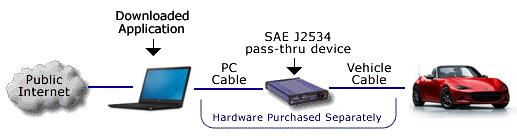
Hardware validated by Mazda can be purchased separately from a third-party supplier. Validation has been done using the following J2534 pass-thru device and cables:
- CarDAQ+ (includes RS232 and Ethernet cables)
- Cable between CarDAQ and Vehicle – CD2534-J1962-FEPS (Sold separately / Required)
Important Information: Mazda makes no representations about the performance of third-party passthru devices. This pass-thru device list is provided voluntarily and as a courtesy. While our software meets SAE J2534, the pass-thru device manufacturer is responsible for making sure their pass-thru device operates properly on each Mazda vehicle and with Mazda software. We have listed the devices below because their manufacturers have attested that the tools have been validated to work. From time to time, we may test these devices. If we determine they do not operate properly or are obsolete, we may remove them from the list, without notice. Additionally, pass-thru devices listed here have been listed for their use with Mazda North American products only. While they may work with some European and other vehicles, they may not meet the requirements for those regions or operate properly.
Hardware can be purchased from a third-party supplier. Mazda has validated the following J2534 passthru devices:
| **J2534 Pass-thru Device | Manufacturer |
| *CarDAQ+ | Drew Technologies Inc. |
| *Pass-Thru+XS | Actia Corp. |
| *Snap-On Pass Thru Pro II | Snap-On. |
| *Universal Reprogrammer | EASE Diagnostics |
| *FLASH2 All-Makes Reprogrammer | CARDONE Industries |
| *Bosch Mastertech VCI | Bosch Diagnostics |
*Contact the device manufacturer for the latest DLL and firmware versions.
**Many J2534 manufacturers sell and market similar J2534 devices with like names. Please exercise caution when using the list above for purposes of understanding devices Mazda has validated for use. J2534 Pass-thru Device Suppliers: Mazda has validated the J2534 devices listed on this page. Mazda does not plan to validate additional J2534 devices at this time.
PCM Reprogramming Process Overview
- Purchase a subscription to PCM Reprogramming on this website.
- Download the application and install it on your PC.
- Connect the J2534 pass-thru device to the PC and the vehicle, and power it up.
- Run the application installed on your PC.
- The application will determine whether or not a new calibration file is available.
- If you choose to use the new file, the module will be reprogrammed.
- If PATS functionality is required, it can be chosen from the toolbox.
https://www.mazdaserviceinfo.com/pcm-reflashing

- J2534 Pass-Thru Programmer: TOPDON RLink J2534 is an advanced diagnostic and reprogramming tool that support all J2534 protocols, as well as D-PDU, CAN-FD and DoIP, ensuring compatibility with a wide range of modern vehicles. It offers extensive versatility with support for over 18 major automotive brands, including Chrysler, Ford, GM, Nissan, Toyota, Honda, Subaru, Land Rover/Jaguar, Volvo, Wuling, Volkswagen/Audi, Mercedes-Benz, and BMW. NOTE: Not compatible with Ford IDS diagnostic software
- All-in-One OEM Diagnostics: This J2534 ECU programming tool elevates your automotive repair capabilities to new heights by delivering complete OEM diagnosis. Boasting comprehensive full-system diagnostics, intuitive repair guides, advanced ECU programming and coding, common reset services, a vast library of repair information and more, this all-in-one solution empowers technicians to effortlessly tackle complex vehicle issues with ease. *Not compatible with 24V vehicles
- Proven Performance You Can Trust: Backed by over 10000 real vehicle tests and benefit from a wealth of practical experience, this OEM reprogramming tool guarantees stable and exceptional performance. Supported by TOPDON's dedicated technical experts with in-depth knowledge of both auto repair and J2534 Pass-Thru programming, the RLink J2534 provides prompt and professional assistance, ensuring a smooth setup and reliable compatibility
- Integrated Excellence, Always Up-to-Date: Featuring the exclusive RLink Platform to provide a streamlined experience with one-click driver installation and management, ensuring flawless integration with your OE software, maintaining the original performance quality. The built-in operation guide makes mastering OE software quick and easy, so you can get started right away. Plus, with lifetime free updates, your diagnostics will stay current with the latest drivers and innovations
- Efficiency Meets Versatility: Engineered to support three CAN channels simultaneously - CAN FD and CAN-CC included, giving you the edge in fast troubleshooting. To perfectly synchronized with the OE software, please diagnose with active subscriptions and make sure your computer system is running a compatible 64-bit Windows version (7, 8, 10 or later) to fully leverage the power of RLink J2534. *We don't provide extra OE software

- Advanced VCI Box, Industry-leading J2534 Pass-Thru Technology: This J2534 Pass-Thru Programmer is designed espically for technicians, independent shop owners, and DIY enthusiasts, enables fast, reliable computer-based programming. It supports all J2534 protocols—including the latest DoIP and CAN FD—ensuring full compatibility with both legacy and next-generation vehicles.
- High-Speed OEM-Level Diagnostics & Programming: Unlock true OEM functionality with comprehensive system diagnostics, guided troubleshooting, coding, adaptations, resets, and programming—all designed to slash repair time. This all-in-one tool eliminates the need for multiple OEM devices, boosting efficiency and cutting costs. Equipped with High-Speed USB, it delivers 10x more data per second than competing solutions
- Coverage for 17 Car Brands & Ultra Reliability: Works seamlessly for Chrysler, for Ford(Forscan), for GM, for Nissan, for Toyota, for Honda, for Subaru(SSM4), for Land Rover/Jaguar, for Volvo, for Wuling, for Volkswagen, for Mercedes-Benz, and for BMW. Backed by over 10000 real vehicle tests and benefit from a wealth of practical experience, this OEM reprogramming tool guarantees stable and exceptional performance
- User-Friendly RLink Platform & Expert Support: TOPDON’s proprietary driver management platform offers a clean interface and lifetime free updates. Access a rich library of real-world case studies to stay ahead of the curve. Backed by a support team with 10+ years of J2534 and automotive repair experience, we provide one-on-one assistance to resolve any technical issue.
- 6.6 ft USB-C Cable & Portable Storage Case: The RLink J2534 diagnostic tool features a 6.6ft USB 2.0 Cable and a 1.2 ft OBDII Extension Cable, allows to connection your computer easily outside the vehicle. The included handled carry case offers easy portability, storage, and hanging options—keeping your gear clean and ready to go, anywhere.

- Dual WiFi & 10.1" Touchscreen: Provides a stable, high-speed wireless link 3x faster than bluetooth, and a responsive, professional interface. Topdon ONE obd2 scanner diagnostic tool ensures smooth, non-lagging diagnostic scan, boosting mechanic efficiency
- J2534 Pass-Thru Support: The included ONE VCI supports the J2534 standard, allowing it to function as a pass-thru device when paired with OEM diagnostic software.Through TOPDON’s RLink platform, technicians can perform dealer-level coding, expanding in-house capabilities without investing in multiple factory automotive scan tools
- OE Topology Mapping: Visualize the vehicle’s ECU network exactly as it’s built.Zoom, pan, and highlight specific modules to pinpoint component issues with precision.Topology mapping displays real-time communication between modules
- 50+ Service Functions: Covers high-demand services like ADAS calibration, DPF regen, TPMS reset, ABS bleed, and throttle adaptation.Expands your service menu, allows you to charge premium rates, and turns away zero jobs due to lack of tooling. Vehicle-specific functionality may vary
- Advaned ECU Coding: 10 of the most serviced brands in North America, including full ECU coding and flash hidden support for BMW, VW, Au-di, Benz, Porsche, Toyota, Ni ssan and more. Enables module replacement, feature customization, and personal settings with automatic backup or restore.Lets your shop safely offer high-margin customization services, attracting more customers and boosting profit

- [J2534 Pass-Thru Programmer] - TOPDON RLink J2534 is engineered for professional technicians, delivering OEM diagnostic and reprogramming capabilities. It supports all J2534 protocols, CAN-FD, DoIP, D-PDU. Compatible with 17 vehicle brands—such as Chrysler, Ford, GM, KIA, Hyundai, Nissan, Toyota, Honda, Subaru, Mitsubishi, MAZDA, Land Rover/Jaguar, Volvo, Volkswagen/Audi, Mercedes-Benz, and BMW. RLink J2534 can help reduce the cost of purchasing equipment from different brands.
- [All-in-One OEM Reprogramming and Diagnostics] - When seamlessly integrated with OEM diagnostic software, this dongle enables you to perform a wide range of functions, including ECU programming and coding, DTC reading and clearing, active tests, component matching, adaptations, rewriting, guided troubleshooting, and more. This all-in-one tool eliminates the need for multiple OEM devices, significantly boosting work efficiency.
- [Tested, Trusted, and Proven for Accuracy] - TOPDON RLink J2534 is renowned for its reliability, having successfully completed over 10,000 real-vehicle tests. The wealth of data and hands-on experience behind it ensures consistent performance and accurate results. You can trust this tool to deliver optimal performance.
- [One-Click Installation, Continuous Updates] - The exclusive TOPDON RLink platform streamlines installation with a one-click driver setup, allowing you to quickly access OEM software for diagnostic and reprogramming tasks. With lifetime free updates, your RLink J2534 stays current without any additional cost, ensuring reliable performance for the long term. *We don't provide extra OE software.
- [Works with Windows Compatibility and OEM Software Subscription] - The RLink J2534 supports three CAN channels - including CAN FD and CAN-CC, providing advantages in the process of rapid troubleshooting. Compatible with Windows 7, 8 and 10 (64-bit) and higher versions of the system. For full functionality, an active OEM software subscription is required for each supported vehicle brand. Please note that the dongle does not include OEM software, which must be purchased separately to access brand-specific diagnostic and reprogramming features.

- 💯【Conta.ct us for Support Directly】For any issues experienced after purchase, please reach out to: 📞autelsupply@ outlook. com🛣️. Our team will provide perfect solution for you. For tech support or [explore additional accessory], please cont.act our team: 📞autelsupply@ outlook. com🛣️.
- 🌎【Autel J2534 Pass-Thru Progra.mmer】As an OEM Pass-Thru Progra.mmer Vehicle interface for multiple makes, Autel MaxiFlash J2534 support all J2534 protocols, D-PDU, CAN-FD and DoIP protocols. 2026 newer Autel MaxiFlash J2534 VCI can works with P-C and download OEM vehicle software, seamlessly conduct OE-level diagnostic-progra.mming-c0ding. Also, Work with Elite II Pro/ Ultra Lite/ MS909/ MS909CV/ MS909EV to directly pro.gram on Merce.des-Be.nz & BM.W. Autel J2534 Progr.ammer is a multi-functional device and supports 10+ major brands, including for Hond.a, G.M, LandRo.ver, BM.W, Chrysl.er, For.d, Hyun.dai, Ki.a, Merc.edes B.enz, Toyot.a, Volksw.agen etc.
- 🌎【Enhanced Protocol: J2534/D-PDU/RP1210/CAN FD/DoIP】Autel MaxiFlash JVCI is a blueto.oth communicate device, it supports latest CAN FD DoIP CAN protocols, compliant with automotive D-PDU/ J2534/ RP1210 standards. It can perform standard PassThru J2534 functions: compatible with Toyota Techstream, Volvo VIDA, Honda HDS, Jaguar Land Rover IDS and BM.W 3G for OEM diagnostics. CAN FD protocol is mainly for GM 2019+, DoIP protocol is mainly for Volvo 2018+, for L-and Rover/for Jaguar 2017+, for BM.W F chassis and G chassis.
- 🌎【Compatible with P-C/ WIND.OWS 】The Autel J2534 VCI can be connected to a compu.ter via a data cable; once the corresponding OEM software is installed, it enables do advanced progr.amming and c0ding on your vehicles. Easy Steps: 1) Connect to P-C via a USB cable 2) download OEM vehicle software 3) Start Diagnose. Take For.d for example, you can download OEM software on mot.orcraft.erservi.ce website, such as: For.d Diagnostic Software downloads, As B.uilt Data, Updated Cali.bration information, then use different software do relevant features.
- 🌎【Work with Autel Elite II Pro/ Ultra Lite/ MS909/ MS909CV/ MS909EV】This 2026 latest Autel J2534 Pass-Thru VCI is 100% compatible with Autel Elite II Pro Ultra Lite MS909 MS909CV MS909EV to perform advanced functions from diagnose to progra.mming.

- 【Advanced VCI Box, Industry-leading J2534 Pass-Thru Technology】This J2534 Pass-Thru Tool is designed espically designed for Professional Technicians and Advanced DIYers. This J2534 Pass-Thru device acts as a bridge between your vehicle and OEM software (sold separately), enabling dealership-level programming and diagnostics. It supports all J2534 protocols—including the latest DoIP and CAN FD—ensuring full compatibility with both legacy and next-generation vehicles.
- 【High-Speed OEM-Level Diagnostics and Functions】Unlock true OEM functionality with comprehensive system diagnostics, guided troubleshooting, coding, adaptations, resets, and rewriting—all designed to slash repair time. This all-in-one tool eliminates the need for multiple OEM devices, boosting efficiency and cutting costs. Equipped with High-Speed USB, it delivers 10x more data per second.
- 【Coverage for 8 Car Brands & Ultra Reliability】Compatible with Factory OEM Software.Fully supports J2534 protocols to work with Manufacturer subscriptions: for Chrysler, for Ford(Forscan), for GM, for Nissan, for Toyota, for Honda, for Fiat/Alfa Romeo/Lancia/Dodge/Ram/Jeep, and for VW/Audi. Backed by over 10000 real vehicle tests and benefit from a wealth of practical experience, this OEM J2534 tool guarantees stable and exceptional performance.
- 【User-Friendly RLink Platform & Expert Support】TOPDON’s proprietary driver management platform offers a clean interface and lifetime free updates. Access a rich library of real-world case studies to stay ahead of the curve. Backed by a support team with 10+ years of J2534 and automotive repair experience, we provide one-on-one assistance to resolve any technical issue. Note: This device requires a computer running Windows 7, 8, 10, or 11 (64-bit or later).
- 【6.6 ft USB-C Cable & Portable Storage Case】 The RLink J2534 diagnostic tool features a 6.6ft USB 2.0 Cable, allows to connection your computer easily outside the vehicle. The included handled carry case offers easy portability, storage, and hanging options—keeping your gear clean and ready to go, anywhere.
This product presentation was made with AAWP plugin.